






















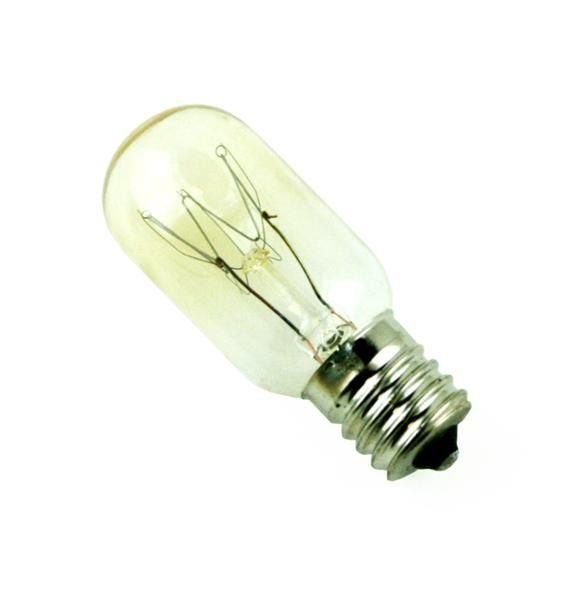
GE APPLIANCE LAMP LIGHT BULB 20W 120V INTERMEDIATE BASE – WB36X10328
$24.72
- Genuine OEM Quality: These parts are manufactured by the same company that made your appliance, ensuring compatibility and performance.
- Perfect Fit: OEM parts are designed to fit your specific appliance model perfectly, reducing the need for modifications or adjustments.
- Optimal Performance: OEM parts deliver the same level of performance and efficiency as the original components, maintaining your appliance’s functionality.
Available on backorder
General Electric – Hotpoint – RCA Appliance Lamp Light Bulb 20W 120V Intermediate Base Step 1: Unplug and turn off the appliance.
Step 2: Locate the lamp assembly in the back of the appliance and remove the light bulb cover by pressing the clips on each side.
Step 3: Carefully take the old light bulb out of the light socket.
Step 4: Insert the new WB36X10328 GE Appliance Lamp Light Bulb into the socket making sure that the contacts line up correctly.
Step 5: Replace the light bulb cover by pressing the clips back into place.
Step 6: Plug in and turn on the appliance to test the new light bulb.
Please keep in mind, these instructions are for general guidance and should always be used in conjunction with the manufacturer’s manual, if available. Search JVM1540LM3CS JVM1540SM6SS JVM1540SM5SS JVM1540SM4SS JVM1540SM3SS JVM1540SM2SS JVM1540SM1SS JVM1540LM6CS JVM1540LM5CS JVM1540LM4CS JVM1810DS1BB JVM1540LM2CS JVM1540LM1CS JVM1540DM6WW JVM1540DM6CC JVM1540DM6BB JVM1540DM5WW JVM1540DM5CC JVM1540DM5BB JVM1540DM4WW JVM2010DS1WW JVM3150SF1SS JNM3151RF1SS JVM3150RF1SS JVM3150DF1BB JNM3151DF1BB JVM3150DF1WW JNM3151DF1WW JVM2010SS1SS JVM1540DM4CC JVM2010DS1BB JVM1810SS1SS JVM1810DS1WW JNM1541DM2BB JNM1541DM5BB JNM1541DM4WW JNM1541DM4CC JNM1541DM4BB JNM1541DM3WW JNM1541DM3CC 1 2
Only logged in customers who have purchased this product may leave a review.

Reviews
There are no reviews yet.