






















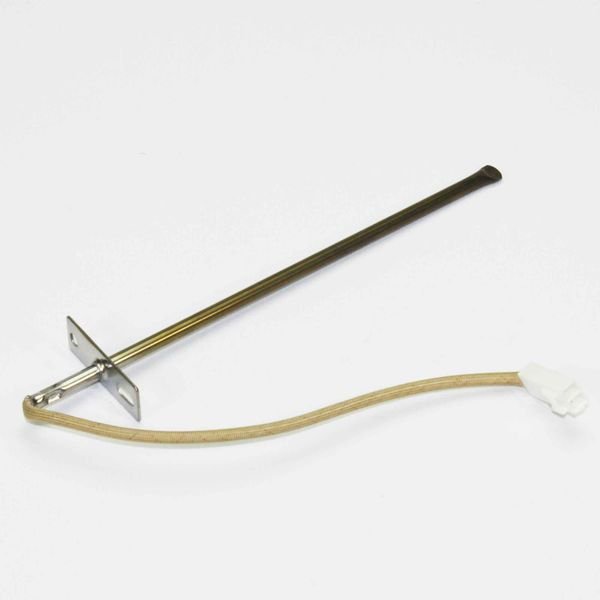
GE TEMPERATURE SENSOR – WB20K10027
$30.61
- Genuine OEM Quality: These parts are manufactured by the same company that made your appliance, ensuring compatibility and performance.
- Perfect Fit: OEM parts are designed to fit your specific appliance model perfectly, reducing the need for modifications or adjustments.
- Optimal Performance: OEM parts deliver the same level of performance and efficiency as the original components, maintaining your appliance’s functionality.
Available on backorder
The GE WB20K10027 Temperature Sensor is a reliable, accurate, and easy-to-install sensor. This sensor is not only capable of accurately measuring temperatures, it also provides you with information about the current temperature in your home or place of business. The temperature readings are accurate to 0.5° Celsius and this sensor has a range from -50° Celsius to +130° Celsius, making it perfect for monitoring even the most extreme temperature changes. With its built-in LCD display, you can easily check the current temperature at any time, without having to worry about complicated wiring. This sensor is perfect for those who want to keep an eye on their environment and ensure optimal temperature regulation. We’re your #1 source for genuine OEM appliance parts. Contact us for further questions as well as any other appliance parts needs! Step 1: Shut off the power to the appliance. Make sure you unplug any power cords leading to the appliance, or shut off the breaker that is supplying power to the appliance.
Step 2: Remove the back panel from the appliance. Depending on your appliance, it may just be clipped in or you may need a few screws to unscrew to get the panel off.
Step 3: Locate and identify the GE WB20K10027 Temperature Sensor. It may look different than the picture – but should still have the same wiring connections.
Step 4: Disconnect the wiring harness lead attached to the sensor. Pull the wires straight up and off, instead of twisting them when removing.
Step 5: Remove the two screws, or other fasteners, holding the sensor into place.
Step 6: Remove the defective GE WB20K10027 Temperature Sensor and discard it.
Step 7: Install the new GE WB20K10027 Temperature Sensor into position. Replace the two screws, or other fasteners.
Step 8: Reconnect the wiring harness lead attached to the sensor, making sure it is snug.
Step 9: Replace the back panel and re-attach it securely.
Step 10: Restore power to the appliance and test the unit to make sure that it is working properly.
Please keep in mind, these instructions are for general guidance and should always be used in conjunction with the manufacturer’s manual, if available. Search CGS975SED1SS CGS975SED3SS EGR3000EP1BB EGR3000EP1WW EGR3000EP2BB EGR3000EP2WW EGR3001EP1SS EGR3001EP2SS JGB250DET1BB JGB250DET1CC JGB250DET1WW JGB250DET2BB JGB250DET2WW JGB250GET1SA JGB250GET2SA JGB250SET1SS JGB250SET2SS JGB280DEN4BB JGB280DEN4WW JGB280DER1CC JGB280MEN4BS JGB280SEN4SS JGB281DER1BB JGB281DER1CC JGB281DER1WW JGB281DER2BB JGB281DER2CC JGB281DER2WW JGB281DER3BB JGB281DER3CC JGB281DER3WW JGB281DER4BB JGB281DER4CC JGB281DER4WW JGB281DER5BB JGB281DER5CC JGB281DER5WW JGB281DER6BB JGB281DER6CC JGB281DER6WW 1 2 3 4 5
Only logged in customers who have purchased this product may leave a review.
Related products

Reviews
There are no reviews yet.