






















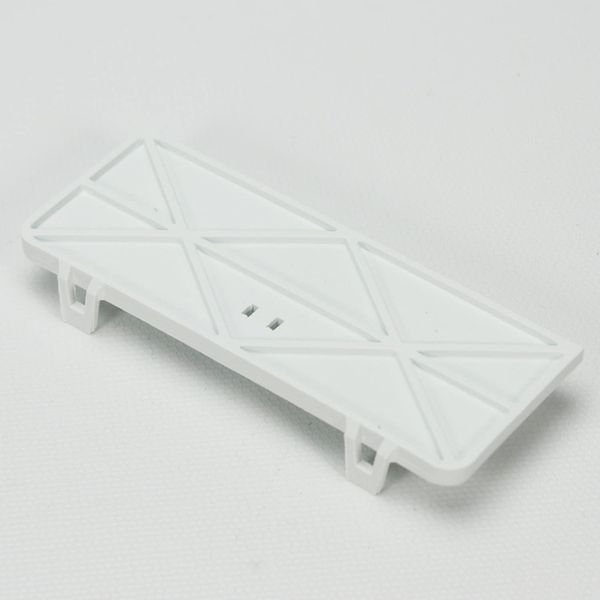
GE INTERLOCK SWITCH COVER – WD12X10401
$15.00
- Genuine OEM Quality: These parts are manufactured by the same company that made your appliance, ensuring compatibility and performance.
- Perfect Fit: OEM parts are designed to fit your specific appliance model perfectly, reducing the need for modifications or adjustments.
- Optimal Performance: OEM parts deliver the same level of performance and efficiency as the original components, maintaining your appliance’s functionality.
Available on backorder
The WD12X10401 GE Interlock Switch Cover is the perfect solution for safely preventing access to electrical components in your home or business. This high-quality part is made of durable, corrosion-resistant plastic and features a tamper-proof design to keep out curious fingers. The cover securely snaps onto the interlock switch and is easy to install with no additional tools. With its sleek design, it will blend seamlessly into any décor. The WD12X10401 is UL-listed, and CSA certified to ensure top-notch safety and performance. Trust GE to keep your family and employees safe from unexpected electrical shocks. We’re your #1 source for genuine OEM appliance parts. Contact us for further questions as well as any other appliance parts needs! DIY Guide to Replacing the WD12X10401 GE Interlock Switch Cover
Replacing the WD12X10401 GE interlock switch cover can be an easy and cost-effective DIY project for any homeowner. This guide will provide step-by-step instructions on how to safely and correctly remove and replace the existing switch cover.
Tools Needed
– Flat blade screwdriver
– Phillips head screwdriver
– New GE WD12X10401 interlock switch cover
Instructions
1. Begin by turning off the power to your appliance at the circuit breaker or fuse box.
2. Place a flat blade screwdriver between the switch and frame and gently pry the frame away from the switch.
3. Unscrew the two screws located at the base of the switch with a Phillips head screwdriver.
4. Carefully pull the switch assembly away from the appliance and disconnect the wiring harness.
5. Install the new WD12X10401 GE interlock switch cover by first connecting the wiring harness.
6. Place the switch into the frame and secure it with the two Phillips head screws.
7. Push the frame back on to the switch ensuring it is properly seated.
8. Turn the power back on to your appliance.
By following these steps, you can replace the WD12X10401 GE interlock switch cover yourself and save time and money.
Please keep in mind, these instructions are for general guidance and should always be used in conjunction with the manufacturer’s manual, if available. Search GLD4604V00WW GLD5664V00SS GLD5660V00SS GLD5654V00CS GLD5604V00WW GLD5604V00CC GLD5604V00BB GLD5600V00WW GLD5600V00CC GLD5600V00BB GLD4664V00SS GLD4644V00SA GLC5604V00BB GLD4604V00BB GLD4560V00SS GLD4550V00CS GLD4500V00WW GLD4500V00CC GLD4500V00BB GLD4468R10SS GLD2850V00CS GLD2800V00WW GLD2800V00BB GLC5604V00WW
Only logged in customers who have purchased this product may leave a review.
Related products

Reviews
There are no reviews yet.