






















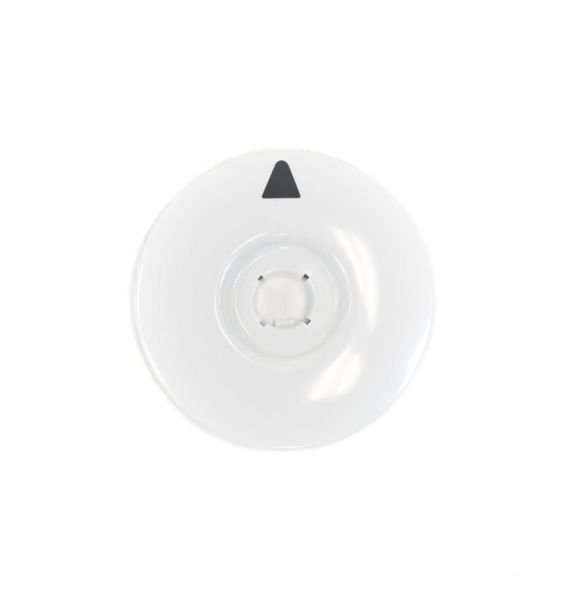
GE WASHER CONTROL TIMER DIAL – WH11X10049
$15.00
- Genuine OEM Quality: These parts are manufactured by the same company that made your appliance, ensuring compatibility and performance.
- Perfect Fit: OEM parts are designed to fit your specific appliance model perfectly, reducing the need for modifications or adjustments.
- Optimal Performance: OEM parts deliver the same level of performance and efficiency as the original components, maintaining your appliance’s functionality.
Available on backorder
GE General Electric Hotpoint RCA Sears Kenmore Washer Washing Machine Control Timer Dial WH11X10049We are a Factory Authorized Parts Distributor for General Electric Hotpoint. Trust us for all of your General Electric Hotpoint appliance parts and accessories needs. DIY Guide to Replacing the WH11X10049 GE Washer Control Timer Dial
1. Unplug the washer from the power source.
2. Remove the cabinet panel or top lid of your washer by unscrewing the screws that secure the panel.
3. Locate and remove the control timer dial. This dial is usually located around the front right corner of your washer. Unscrew the bolts that are holding the timer in place.
4. Take out the old timer and disconnect the wiring harness.
5. Connect the new control timer to the wiring harness.
6. Reattach the control timer to the washer using the screws you had removed earlier.
7. Gently place the cabinet panel or top lid of the washer back in its original position and securely screw it into place.
8. Plug the washer back into the power source and turn it on. Adjust the timer dial to the desired setting and test the washer.
By following the above DIY instructions for replacing the WH11X10049 GE Washer Control Timer Dial, you can easily update your washer and ensure it runs optimally.
Please keep in mind, these instructions are for general guidance and should always be used in conjunction with the manufacturer’s manual, if available. Search 57731H7WW 57731H8WW 57731H9WW GBSR3140H4WW GBSR3140H5WW GBSR3140H6WW GBSR3140H7WW GCSR2090H0WW GCSR2090H2WW GCSR2090H3WW GCSR2090H5WW GCSR2090H6WW GCSR2090H7WW GCSR2090H8WW GCWP1000M0WW GCWP1000M1WW GCWP1000M2WW GFSR3110H0WW GFSR3110H1WW GFSR3110H2WW GFSR3110H3WW GFSR3110H4WW GFSR3110H5WW GFSR3110H6WW GHDSR209H0WW GHDSR209H2WW GHDSR209H3WW GHDSR209H5WW GHDSR209H6WW GHDSR209H7WW GHDSR209H8WW GHDSR209H9WW GHDSR316H0WW GHDSR316H1WW GHDSR316H2WW GHDSR316H3WW GHDSR316H4WW GHDSR316H5WW GHDSR316H6WW GHDSR316H7WW 1 2 3 4 5
Only logged in customers who have purchased this product may leave a review.
Related products

Reviews
There are no reviews yet.