






















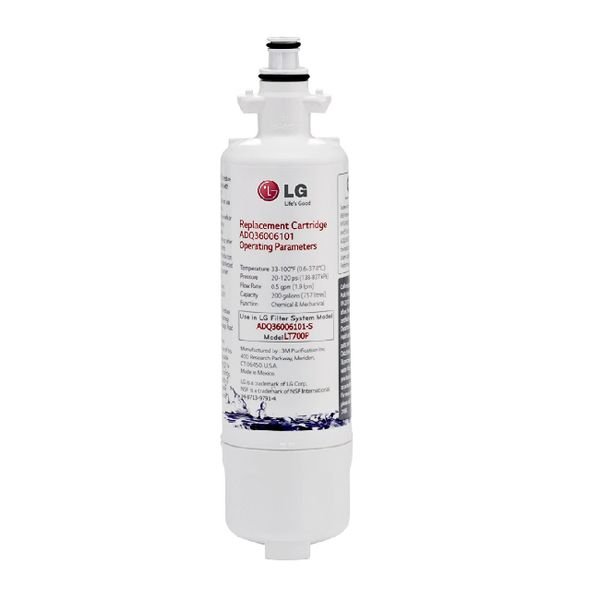
LG LT700P WATER FILTER ASSEMBLY – ADQ36006101
$61.76
- Genuine OEM Quality: These parts are manufactured by the same company that made your appliance, ensuring compatibility and performance.
- Perfect Fit: OEM parts are designed to fit your specific appliance model perfectly, reducing the need for modifications or adjustments.
- Optimal Performance: OEM parts deliver the same level of performance and efficiency as the original components, maintaining your appliance’s functionality.
Available on backorder
LG Electronics Sears Kenmore Refrigerator WATER FILTER ASSEMBLY ADQ36006101Call us with your LG Sears Kenmore Appliance model number to be sure you receive the correct part. 1. Unplug the power to your LG refrigerator.
2. Locate the water filter assembly. On most LG models, it’s in the front base grille.
3. Pull down on the front edge of the plastic frame located at the bottom of the grille, and then pull the entire grille away from the refrigerator.
4. Twist the water filter 1/4 turn counter-clockwise to unlock it from the plastic housing.
5. Pull out the water filter.
6. Take note of the orientation of the new filter – there should be a few arrows on the side indicating the flow direction.
7. Insert the new filter into the housing and twist 1/4 turn clockwise to lock it in place.
8. Align the grille with the mounting tabs around the filter and push the grille back into position.
9. Plug the power back into the refrigerator and reset the indicator light, if applicable.
10. Run some water through the filter to ensure proper flow and discard the first few glasses of water that come out.
Please keep in mind, these instructions are for general guidance and should always be used in conjunction with the manufacturer’s manual, if available. Search LSSB2691ST LSSB2696BD LSSB2791ST LSFS213ST DYF42BSIWS LFD22786SW LFDS22520S LFX21976ST LFXS24663S LFX28968D LFX28968ST LFX28968SW LFXS24623S LFXS24623W UPSXB2627S 73055 72495 73054 LMXS27626D
Only logged in customers who have purchased this product may leave a review.
Related products


Reviews
There are no reviews yet.