






















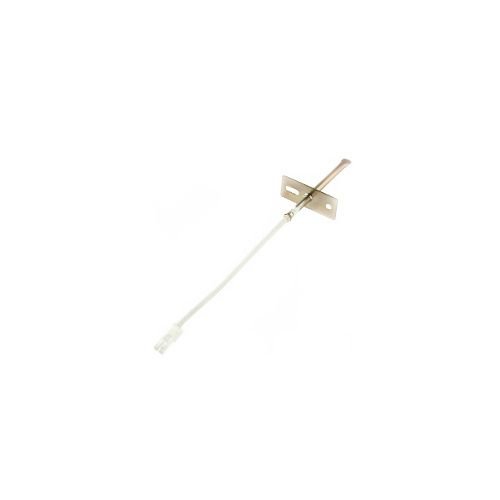
SAMSUNG OVEN TEMPATURE SENSOR – DE81-07435A
$41.75
- Genuine OEM Quality: These parts are manufactured by the same company that made your appliance, ensuring compatibility and performance.
- Perfect Fit: OEM parts are designed to fit your specific appliance model perfectly, reducing the need for modifications or adjustments.
- Optimal Performance: OEM parts deliver the same level of performance and efficiency as the original components, maintaining your appliance’s functionality.
Available on backorder
Temperature sensor works with some Dacor models of range / wall ovens. Replacing the Samsung DE81-07435A TEMPERATURE SENSOR 72752
When the temperature sensor 72752 in your Samsung DE81-07435A appliance begins to malfunction, you may need to replace it. Replacing the temperature sensor can be a difficult and time consuming task. However, with some patience and the right tools and materials, replacing it yourself is possible. Here is a guide on how to replace the Samsung DE81-07435A TEMPERATURE SENSOR 72752.
Tools & Materials Needed:
• Phillips head screwdriver
• Flathead screwdriver
• Safety goggles
• Pliers
• New Samsung DE81-07435A TEMPERATURE SENSOR 72752
Instructions:
1. Unplug the appliance from the power source and turn off the gas supply to the appliance.
2. Remove the screws that secure the access panel and remove the access panel to expose the sensor.
3. Remove the existing temperature sensor by using a flathead screwdriver to unscrew the sensor from its base.
4. Disconnect the wires from the old sensor (you may need to use pliers).
5. Connect the new sensor’s wires to the appliance’s wiring.
6. Secure the sensor in place by using a Phillips head screwdriver to tighten the screws.
7. Replace the access panel and secure with screws.
8. Turn on the gas supply and plug the appliance back in to the power source.
9. Test the new sensor and ensure that it is functioning properly.
By following these steps, you will be able to successfully replace the Samsung DE81-07435A TEMPERATURE SENSOR 72752. Always take safety precautions and always be sure to turn off the gas supply before beginning any repairs.
Please keep in mind, these instructions are for general guidance and should always be used in conjunction with the manufacturer’s manual, if available. No more associated models for this part.
Only logged in customers who have purchased this product may leave a review.
Related products

Reviews
There are no reviews yet.