






















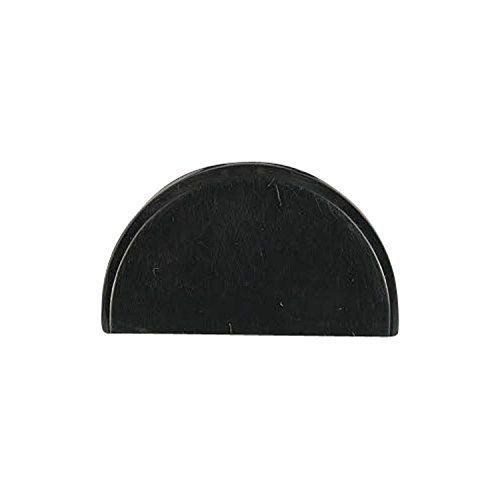
SAMSUNG REFRIGERATOR HANDLE CAP SUPPORT – DA67-02788B
$15.00
- Genuine OEM Quality: These parts are manufactured by the same company that made your appliance, ensuring compatibility and performance.
- Perfect Fit: OEM parts are designed to fit your specific appliance model perfectly, reducing the need for modifications or adjustments.
- Optimal Performance: OEM parts deliver the same level of performance and efficiency as the original components, maintaining your appliance’s functionality.
Available on backorder
Introducing the Samsung DA67-02788B CAP-SUPT HANDLE REF;AW3,ABS,BL. This sophisticated handle is perfect for commercial and domestic use and will make your cabinets look modern and stylish. Crafted from superior ABS material and available in a sleek black finish, this handle has an ergonomic shape and size that makes it comfortable to use. It’s robust and long-lasting, so you can be sure it’ll last for years to come. It’s easy to install too, with all the necessary fixings included. Whether you’re looking to upgrade your existing kitchen or create a contemporary look for a new one, this Samsung handle is perfect. We’re your #1 source for genuine OEM appliance parts. Contact us for further questions as well as any other appliance parts needs! How to Replace the Samsung DA67-02788B CAP-SUPT HANDLE REF;AW3,ABS,WHITE
Replacing the Samsung DA67-02788B CAP-SUPT HANDLE REF;AW3,ABS,WHITE is a simple do-it-yourself project that will help keep your appliance functioning properly and looking good. Here are the steps you’ll need to follow to replace this part:
1. Unplug your appliance from the wall and turn off all the power switches connected to it. This will prevent any harm from coming to you while working on the device.
2. Open the appliance door and locate the Samsung DA67-02788B CAP-SUPT handle. On most models, this handle is located at the top of the appliance interior.
3. Using a screwdriver, unscrew the screws that are holding the handle in place. Depending on the model, the handle may be held by two or four screws.
4. Carefully pull the handle away from the appliance and discard the old one.
5. Take your new Samsung DA67-02788B CAP-SUPT handle, align it with the appliance door, and secure it with the screws.
6. Plug your appliance back in and turn on the power switch(es).
7. Test the new handle and make sure it’s working correctly.
8. Congratulations! You have successfully replaced the Samsung DA67-02788B CAP-SUPT handle.
Please keep in mind, these instructions are for general guidance and should always be used in conjunction with the manufacturer’s manual, if available. Search RF28HFEDTBC/AA-08 RF28HFEDBBC-AA-09 RF28HFEDTBC/AA-04 RF28HFEDTBC/AA-05 RF28HFEDTBC/AA-06 RF28HFEDTBC/AA-07 RF28HFEDBBC-AA-08 RF28HFEDTBC/AA-09 RF323TEDBBC-AA-01 RF323TEDBBC-AA-02 RF323TEDBBC-AA-03 RF323TEDBBC-AA-04 RFG238AABP/XAA-00 RF263TEAEBC/AA-02 RF23HCEDBBC-AA-00 RF260BEAEBC-AA-01 RF261BEAEBC-AA-01 RF263BEAEBC/AA-01 RF263BEAESP/AA-01 RF263TEAEBC-AA-01 RF28HFEDBBC-AA-04 RF28HFEDBBC-AA-05 RF28HFEDBBC-AA-06 RF28HFEDBBC-AA-07
Only logged in customers who have purchased this product may leave a review.




Reviews
There are no reviews yet.