






















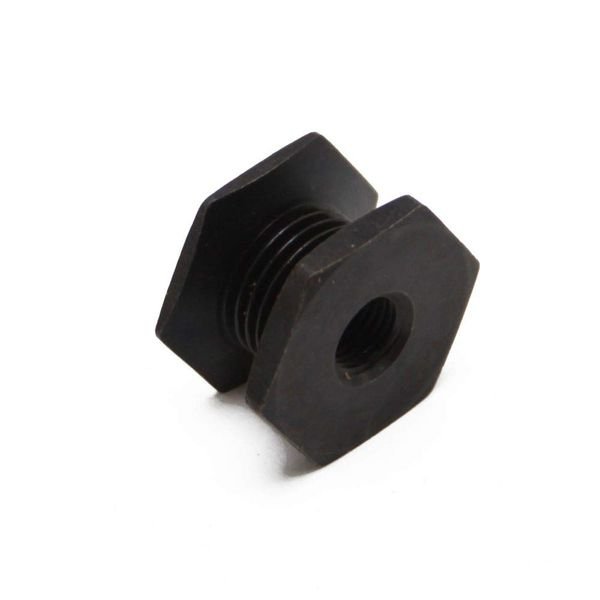
SAMSUNG DRYER DRIVE MOTOR PULLEY – DC81-00220A
$42.11
- Genuine OEM Quality: These parts are manufactured by the same company that made your appliance, ensuring compatibility and performance.
- Perfect Fit: OEM parts are designed to fit your specific appliance model perfectly, reducing the need for modifications or adjustments.
- Optimal Performance: OEM parts deliver the same level of performance and efficiency as the original components, maintaining your appliance’s functionality.
Available on backorder
Samsung Sears Kenmore Clothes Dryer DRIVE MOTOR PULLEY DC81-00220A Replacing the DC81-00220A Samsung Dryer DRIVE MOTOR PULLEY
Replacing the drive motor pulley on your Samsung dryer is a straightforward process that can be completed in only a few minutes. Read through this guide to learn the simple steps involved in replacing the DC81-00220A Samsung dryer drive motor pulley.
Tools Needed
#1 Phillips screwdriver
Instructions
1. Unplug your dryer from the wall outlet to avoid electric shock.
2. Lift the lint filter up and out of the lint filter housing to access the drive motor.
3. Remove the screws securing the access panel to the back of the dryer with a #1 Phillips screwdriver.
4. Carefully slide the access panel off of the dryer and set aside.
5. Locate the drive motor pulley on the back of the dryer and remove the screws holding it in place.
6. Carefully remove the old pulley and discard.
7. Insert the new DC81-00220A Samsung dryer drive motor pulley into position, ensuring that the pulley is properly aligned with the motor shaft.
8. Secure the pulley in place with the screws removed in step 5.
9. Replace the access panel and secure with screws.
10. Reinstall the lint filter into the lint filter housing.
11. Plug your dryer back into the wall outlet.
Your Samsung dryer is now ready for use with the replacement DC81-00220A drive motor pulley!
Please keep in mind, these instructions are for general guidance and should always be used in conjunction with the manufacturer’s manual, if available. No more associated models for this part.
Only logged in customers who have purchased this product may leave a review.
Related products


Reviews
There are no reviews yet.