






















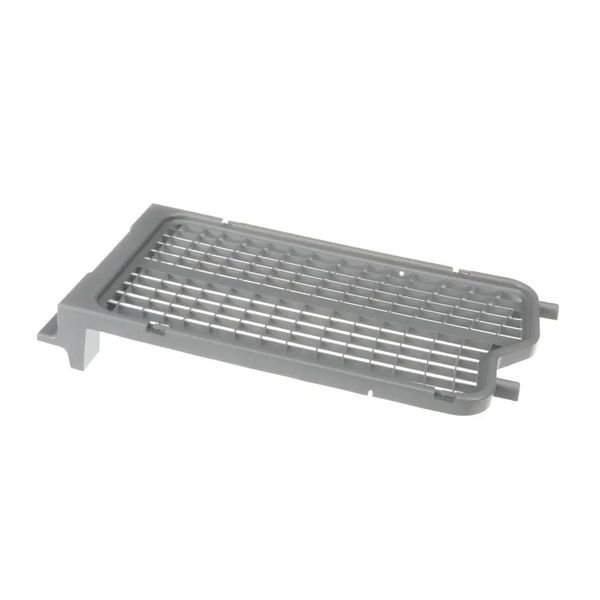
SAMSUNG DRYER DIE RACK DRY ASSEMBLY – DC93-00374H
$170.02
- Genuine OEM Quality: These parts are manufactured by the same company that made your appliance, ensuring compatibility and performance.
- Perfect Fit: OEM parts are designed to fit your specific appliance model perfectly, reducing the need for modifications or adjustments.
- Optimal Performance: OEM parts deliver the same level of performance and efficiency as the original components, maintaining your appliance’s functionality.
Available on backorder
Die Rack Dry Assembly works with some models of Samsung Dryers Step 1: Disconnect the power source to the dryer. Remove the screws that secure the back panel or the side panels of the dryer, if necessary.
Step 2: Use a socket wrench to remove the die rack assembly’s mounting screws and then gently pull the die rack assembly out of the dryer.
Step 3: Inspect the interior of the dryer for any lint or debris that may have gathered around the area where the die rack was installed. Make sure the area is completely free of any debris before installing the new die rack assembly.
Step 4: Place the new DC93-00374H Samsung Dryer Die Rack Assembly into the dryer, aligning it with the dryer’s mounting holes. Secure the die rack assembly in place by hand-tightening the mounting screws.
Step 5: Re-connect the power source to the dryer and test the dryer’s operation.
Step 6: Clean up any remaining debris or dust in the area where the new die rack assembly was installed and make sure that no excess lint remains inside the dryer.
Please keep in mind, these instructions are for general guidance and should always be used in conjunction with the manufacturer’s manual, if available. No more associated models for this part.
Only logged in customers who have purchased this product may leave a review.


Reviews
There are no reviews yet.