






















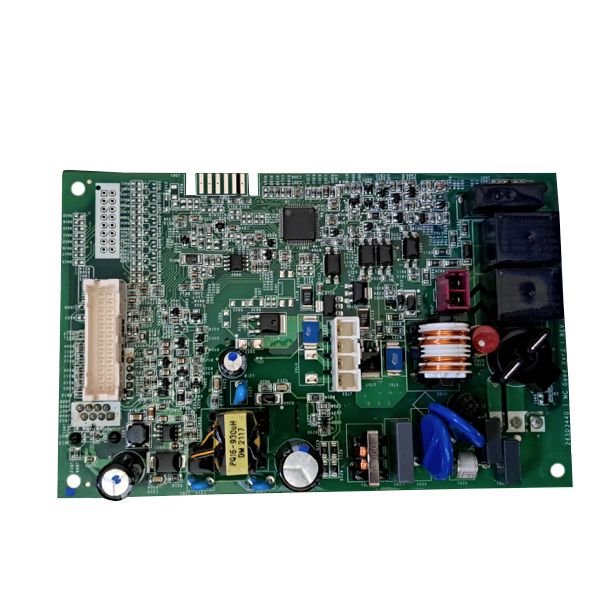
GE CONTROL BOARD – WD21X26439
$142.85
- Genuine OEM Quality: These parts are manufactured by the same company that made your appliance, ensuring compatibility and performance.
- Perfect Fit: OEM parts are designed to fit your specific appliance model perfectly, reducing the need for modifications or adjustments.
- Optimal Performance: OEM parts deliver the same level of performance and efficiency as the original components, maintaining your appliance’s functionality.
Available on backorder
Introducing the GE WD21X26439 CNTRL BOARD CONFIGR SRVS MAC – the perfect addition to your laundry room. This advanced control board features a sleek modern design that offers easy installation and configuration. The board utilizes advanced software and a robust interface to allow full control of your washer and dryer. With this board, you can easily monitor cycles and settings from anywhere in your home. It comes with integrated safety features such as temperature sensing and overload protection to provide maximum safety for all your laundry needs. Plus, it comes with service and maintenance alerts, so you’re always up to date on your machine’s performance. Equip your laundry room with the imperative components to ensure maximum efficiency – with the GE WD21X26439 CNTRL BOARD CONFIGR SRVS MAC. We’re your #1 source for genuine OEM appliance parts. Contact us for further questions as well as any other appliance parts needs! How to Replace the GE WD21X26439 Control Board Configurator Services MAC
Replacing the GE WD21X26439 control board configurator Services MAC can be done in a few easy steps. This guide will help you do the replacement quickly and easily.
1. Locate the 4 screws holding the control board in place. Remove these screws using a flathead screwdriver.
2. Gently pry off the plastic cover from the control board.
3. Disconnect the power cables that are connected to the board, labeled P1 and P2.
4. Place the new control board into the same location. Make sure the board is aligned properly and replace the plastic cover.
5. Reconnect the power cables making sure they are securely fastened in place.
6. Secure the control board with the four screws you removed earlier.
7. Plug the power cord back in and turn on the power switch. The new control board should now be working and configuring the services for your MAC device.
With these simple steps, you can successfully replace the GE WD21X26439 control board configurator services MAC. Be sure to use caution when replacing the board, as it is an electrical component. If you have any questions, consult the manual for the device or contact a certified technician for assistance.
Please keep in mind, these instructions are for general guidance and should always be used in conjunction with the manufacturer’s manual, if available. No more associated models for this part.
Only logged in customers who have purchased this product may leave a review.
Related products

Reviews
There are no reviews yet.