






















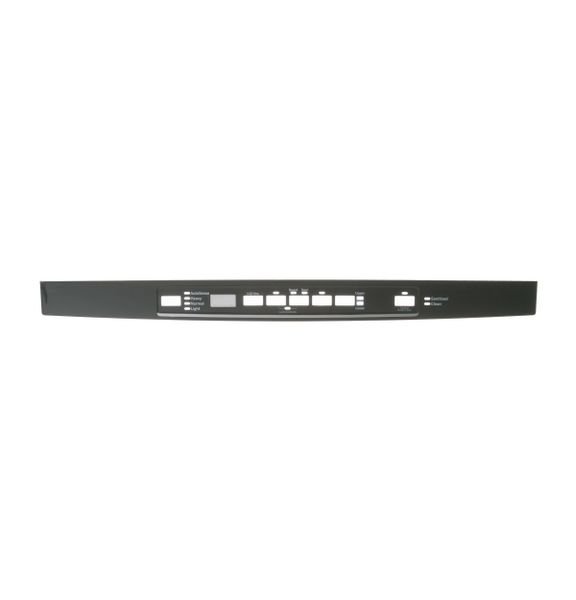
GE CONTROL PANEL – WD34X24429
$33.33
- Genuine OEM Quality: These parts are manufactured by the same company that made your appliance, ensuring compatibility and performance.
- Perfect Fit: OEM parts are designed to fit your specific appliance model perfectly, reducing the need for modifications or adjustments.
- Optimal Performance: OEM parts deliver the same level of performance and efficiency as the original components, maintaining your appliance’s functionality.
Available on backorder
The GE WD34X24429 Console Cover Graphic Assembly is the perfect addition to any home. This essential piece of kitchen equipment provides a stylish and secure way to protect your stovetop. The easy-to-install design fits most standard gas, electric, and dual-fuel cooktops. Constructed of durable graphite-coated steel, it is scratch and heat-resistant to ensure long-term protection of your stovetop. An attractive graphic design lends a decorative touch. This assembly also comes with a limited one-year warranty for added peace of mind. Upgrade your cooktop today with the GE WD34X24429 Console Cover Graphic Assembly. We’re your #1 source for genuine OEM appliance parts. Contact us for further questions as well as any other appliance parts needs! How to Replace the GE WD34X24429 Console Cover Graphic Assembly
1. Unplug the machine or turn off the power supply before starting any repairs.
2. Remove the console top cover. This is the piece that covers the control board. Depending on the model of your unit, you will either need to remove a few screws or pull up on the console top cover to release the springs underneath.
3. Once the top cover is removed, locate the defective console cover graphic assembly and remove it from the control board.
4. Unpack the new graphic assembly, align the prongs on the assembly with the slots in the board and securely press down on the assembly to ensure complete connection.
5. Re-install the console top cover and secure with the appropriate hardware.
6. Plug in the machine or turn on the power supply.
7. Test the machine to make sure the replacement was successful.
8. If the machine is functioning properly, you have successfully replaced the GE WD34X24429 console cover graphic assembly.
Please keep in mind, these instructions are for general guidance and should always be used in conjunction with the manufacturer’s manual, if available. Search GDT535PSM0SS GDT540PSM0SS
Only logged in customers who have purchased this product may leave a review.
Related products

Reviews
There are no reviews yet.