






















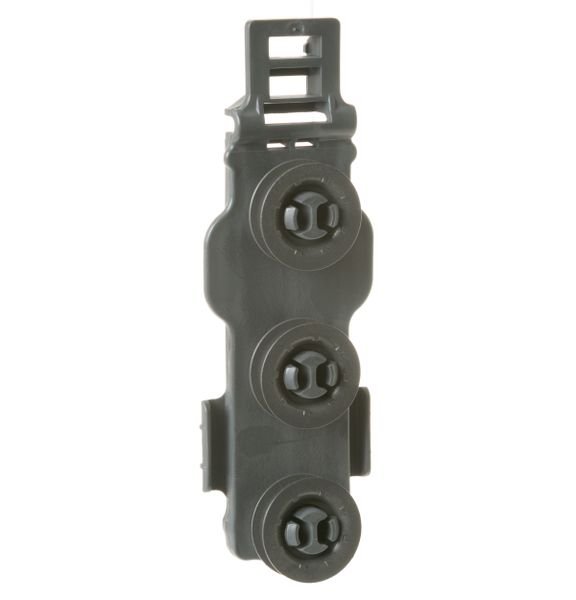
GE DISHRACK ROLLER – WD12X22801
$27.21
- Genuine OEM Quality: These parts are manufactured by the same company that made your appliance, ensuring compatibility and performance.
- Perfect Fit: OEM parts are designed to fit your specific appliance model perfectly, reducing the need for modifications or adjustments.
- Optimal Performance: OEM parts deliver the same level of performance and efficiency as the original components, maintaining your appliance’s functionality.
Available on backorder
The GE WD12X22801 RACK BRACKET with 3 WHEELS is designed to give you the ultimate flexibility and convenience when it comes to storing items. This heavy-duty steel bracket features three wheels and can be mounted to a wall or ceiling, making it easy to move items around in your workspace. The wheels are made of durable rubber, providing smooth movement and stability while in use. The bracket is perfect for storing heavy items such as tools, equipment, and more. Its rust-resistant finish ensures that this product will last for years to come. With the GE WD12X22801 RACK BRACKET with 3 WHEELS, you can easily create an efficient and organized space in your home or office. We’re your #1 source for genuine OEM appliance parts. Contact us for further questions as well as any other appliance parts needs! DIY Guide to Replacing a GE WD12X22801 Rack Bracket (3 Wheels)
Whether you’re dealing with a broken wheel or a damaged rack bracket on your GE WD12X22801 appliance, a replacement of the 3 wheels can help you get your appliance running smoothly and efficiently. Follow this easy DIY guide to replace the rack bracket and get your appliance back to its best.
Materials Needed:
– WD12X22801 rack bracket (3 wheels)
– 1/4-inch nut driver
– WD12X10155 roller axle
– Phillips screwdriver
Step 1: Unplug the appliance from the power source and remove the racks from the unit.
Step 2: Use a nut driver to remove the screws that attach the broken wheel or damaged rack bracket to the bottom of the appliance.
Step 3: Install the new WD12X22801 rack bracket by aligning the holes on the new part with the holes in the bottom of the appliance. Make sure the wheel is firmly seated in place.
Step 4: Reinstall the screws to secure the wheel in place.
Step 5: Attach the wheel axle and adjust it so that it fits snugly between the side rails of the rack bracket. Secure the wheel axle in place using a Phillips screwdriver.
Step 6: Test the wheel for smooth and consistent rotation before replacing the racks and plugging the appliance back in.
Congratulations! Your GE WD12X22801 is now ready to use after successfully replacing the rack bracket.
Please keep in mind, these instructions are for general guidance and should always be used in conjunction with the manufacturer’s manual, if available. Search GDF610PGJ5BB GDF610PGJ5WW GDF610PGJ4BB GDF610PGJ4WW GDF610PGJ2BB GDF610PGJ0WW GDF610PGJ0BB GDF610PGJ2WW GDT545PGJ6WW GDT635HGJ6BB GDF620HGJ6BB GDF610PSJ6SS GDF610PMJ6ES GDT635HSJ6SS GDT635HGJ6WW GDF610PGJ6WW GDT635HMJ6ES GDF520PSJ6SS GDF520PMJ6ES GDF620HGJ6WW GDT625PGJ6WW GDT625PGJ6BB GDF610PGJ6BB GDF520PGJ6CC GDF620HSJ6SS GDF520PGJ6WW GDT625PSJ6SS GDF520PGJ6BB GDF620HMJ6ES GDT545PFJ6DS GDT545PGJ6BB GDF570SGJ5BB GDF570SGJ5WW GDF570SGJ5CC GDF570SSJ5SS GDT545PSJ6SS GDF630PFM0DS GDT635HMM0ES GDF530PSM0SS GDF530PGM0CC 1 2 3 4 5
Only logged in customers who have purchased this product may leave a review.

Reviews
There are no reviews yet.