






















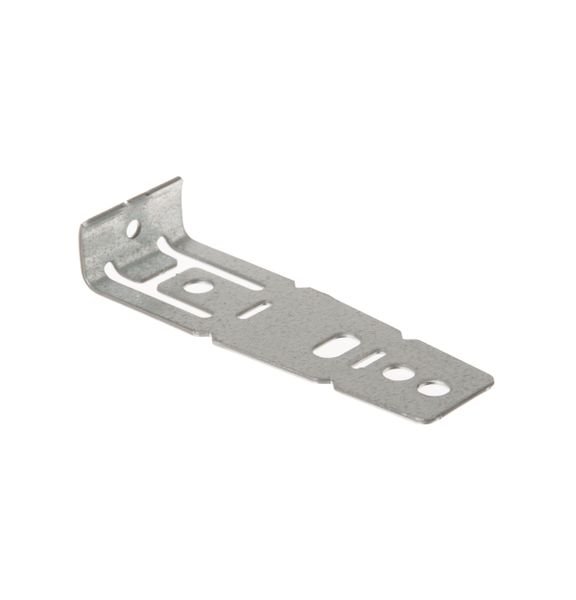
GE DISHWASHER COUNTERTOP MOUNTING BRACKET – WD01X21740
$15.00
- Genuine OEM Quality: These parts are manufactured by the same company that made your appliance, ensuring compatibility and performance.
- Perfect Fit: OEM parts are designed to fit your specific appliance model perfectly, reducing the need for modifications or adjustments.
- Optimal Performance: OEM parts deliver the same level of performance and efficiency as the original components, maintaining your appliance’s functionality.
Available on backorder
Countertop mounting bracket works with some GE, and Hotpoint models of dishwashers. Replacing the WD01X21740 GE Dishwasher Countertop Mounting Bracket
1. Shut off the power to the dishwasher by unplugging the unit or turning the circuit breaker off at the main electrical panel.
2. Pull the dishwasher out of its enclosure and place it on a flat surface.
3. Remove the existing countertop mounting bracket by unscrewing the two mounting screws on the bracket’s side.
4. Unhook the latch at the top of the dishwasher for easy access to the inside. This is usually done by placing a putty knife between the top of the dishwasher and the countertop and pressing firmly.
5. Slide the new GE WD01X21740 countertop mounting bracket into position. Make sure that all four points where the ledge of the bracket connects to the dishwasher are securely fastened.
6. Reattach the latch at the top of the dishwasher, then secure the bracket to the countertop with the two screws provided.
7. Push the dishwasher back into position and secure any additional screws.
8. Restore the power to the dishwasher by plugging the unit back into an outlet or turning the circuit breaker back on at the main electrical panel.
Please keep in mind, these instructions are for general guidance and should always be used in conjunction with the manufacturer’s manual, if available. Search GDF610PGJ5BB GDF610PGJ5WW GDF610PGJ4BB GDF610PGJ4WW GDF610PGJ2BB GDF610PGJ0WW GDF610PGJ0BB GDF610PGJ2WW GDT545PGJ6WW GDT635HGJ6BB GDF620HGJ6BB GDF610PSJ6SS GDF610PMJ6ES GDT635HSJ6SS GDT535PGJ6BB GDT635HGJ6WW GDF610PGJ6WW GDF510PGJ6WW GDT635HMJ6ES GDT535PSJ6SS GDF520PSJ6SS GDF520PMJ6ES GDF620HGJ6WW GDT625PGJ6WW GDT535PGJ6WW GDT625PGJ6BB GDF610PGJ6BB GDF510PMJ6SA GDF510PGJ6BB GDF520PGJ6CC GDF620HSJ6SS GDF520PGJ6WW GDT625PSJ6SS GDF520PGJ6BB GDF620HMJ6ES GDT545PFJ6DS GDT535PSM0SS GDT535PGM0WW GDF511PGM0WW GDT535PGM0BB 1 2 3 4 5
Only logged in customers who have purchased this product may leave a review.

Reviews
There are no reviews yet.