






















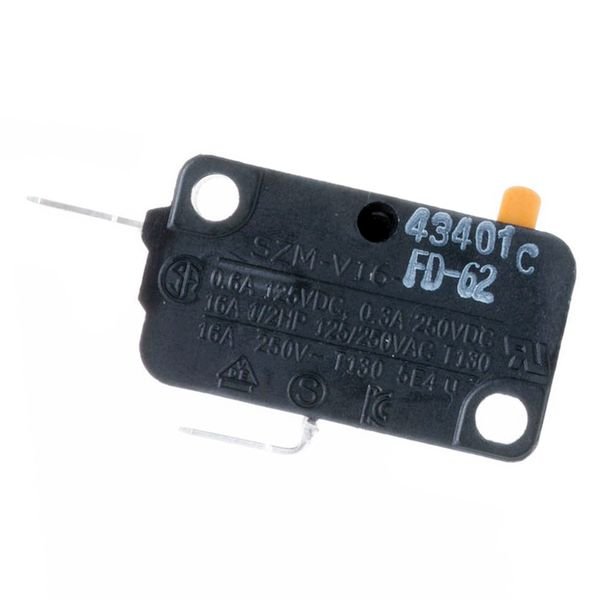
GE DOOR SWITCH – WB24X830
$44.57
- Genuine OEM Quality: These parts are manufactured by the same company that made your appliance, ensuring compatibility and performance.
- Perfect Fit: OEM parts are designed to fit your specific appliance model perfectly, reducing the need for modifications or adjustments.
- Optimal Performance: OEM parts deliver the same level of performance and efficiency as the original components, maintaining your appliance’s functionality.
Available on backorder
The GE WB24X830 SW-MONITOR is a powerful and versatile monitoring solution that is designed to meet the needs of both professional and amateur users. This device helps you monitor your home or office environment effectively and reliably. It comes with an easy-to-use interface that allows you to set up and customize alerts to be sent to your mobile device in case of any changes in temperature, humidity, and air quality. It also offers various alarms to keep you informed in case of any unusual activities. With its wide range of features, the GE WB24X830 SW-MONITOR is the perfect choice for anyone who wants to take a proactive approach to monitoring their home or office environment. We’re your #1 source for genuine OEM appliance parts. Contact us for further questions as well as any other appliance parts needs! DIY Guide for Replacing a GE WB24X830 SW-Monitor
Replacing a GE WB24X830 SW-Monitor is a job most DIY-ers can tackle in an afternoon. This guide will walk you through the steps to replacing your monitor safely and successfully.
Safety First: Whenever working on electrical components, make sure to unplug the power source and follow basic safety precautions.
Step 1: Gather Your Needed Tools and Materials
• Philips head screwdriver
• Phillips head bit
• NEW GE WB24X830 SW Monitor
Step 2: Remove the Old Monitor
• Locate the screws that secure the old monitor’s frame to the wall.
• Unscrew and remove the old monitor from the wall.
• Disconnect any cables or wires that are attached to the back of the monitor.
Step 3: Attach the New Monitor
• Check that the new GE WB24X830 SW Monitor is compatible with your system.
• Connect any necessary cables or wires to the back of the new monitor.
• Secure the new monitor to the wall using the same screws you removed in Step 2.
• Plug in the power source and test the monitor.
Conclusion: Congratulations! You have successfully replaced your GE WB24X830 SW Monitor.
Please keep in mind, these instructions are for general guidance and should always be used in conjunction with the manufacturer’s manual, if available. No more associated models for this part.
Only logged in customers who have purchased this product may leave a review.

Reviews
There are no reviews yet.