






















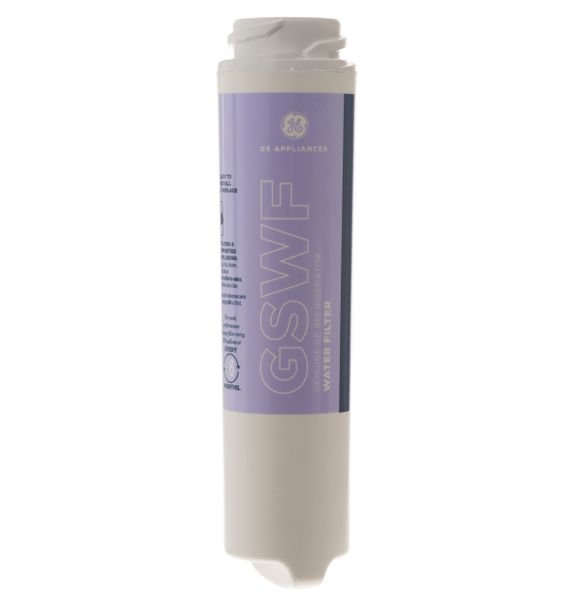
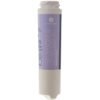
GE GE SMARTWATER WATER FILTER CARTRIDGE – GSWF
$51.17
- Genuine OEM Quality: These parts are manufactured by the same company that made your appliance, ensuring compatibility and performance.
- Perfect Fit: OEM parts are designed to fit your specific appliance model perfectly, reducing the need for modifications or adjustments.
- Optimal Performance: OEM parts deliver the same level of performance and efficiency as the original components, maintaining your appliance’s functionality.
Available on backorder
GE General Electric Hotpoint Sears Kenmore SmartWater Filter GSWFGE SmartWater Refrigerator water filter fits the newer GE fridges. Reduces lead, cysts, chlorine sediment and much more. Has a 750 gallon capacity.We are a Factory Authorized Parts Distributor for General Electric. Trust us for all of your General Electric appliance parts and accessories needs. Replacing the GSWF GE SmartWater Filter
If the refrigerator you own is equipped with the GSWF GE SmartWater filter, it’s important that you replace this filter regularly in order to ensure a clean water supply. Replacing the GSWF GE SmartWater filter is a simple process and can easily be done at home without the assistance of a professional. This guide will provide an easy step-by-step set of instructions so that you can replace your GSWF GE SmartWater filter quickly and correctly.
Step 1 – First, start by locating the filter. For most General Electric refrigerators, the GSWF GE SmartWater filter is located in the back upper-right hand corner of the fridge.
Step 2 – Take off the end cap of the filter. To do this, make sure to use a flathead screwdriver or a similar tool to pry off the cap.
Step 3 – Next, pull out the old filter and discard it. Be sure to dispose of the old filter properly and in accordance with all local regulations.
Step 4 – Extract the new GSWF GE SmartWater filter from its packaging. Make sure to remember the arrows when taking the filter out, as the arrows indicate the direction of water flow.
Step 5 – Insert the new filter into the connection point you had taken the old filter out of. Push the filter firmly into place, ensuring that it’s fully inserted.
Step 6 – Reattach the end cap of the filter. Make sure it is tight and secure.
Step 7 – Next, it’s time to flush out the system. Run cold water through the filter for around five minutes, allowing the water to purge any sediments and particles.
Step 8 – Lastly, reset the filter indicator light. Each General Electric refrigerator that has a GSWF GE SmartWater filter should have a button or switch to reset the filter indicator light.
Once you’ve completed all these steps, your GSWF GE SmartWater filter has been replaced and you can now enjoy fresh, clean water from your refrigerator. To ensure optimal performance, be sure to check your refrigerator’s manual for information on how often to replace the filter.
Please keep in mind, these instructions are for general guidance and should always be used in conjunction with the manufacturer’s manual, if available. Search CFCP1NIXASS CFCP1NIXBSS CFCP1NIXCSS GFSF2KEXABB GFSF2KEXACC GFSF2KEXAWW GFSL2KEXALS GFSS2KEXASS GTH22SHPARBS GTH22SHRARBS GTH22SHSARSS GTS18KHPARBB GTS18KHPARCC GTS18KHPARWW GTS18KHPCRBB GTS18KHPCRCC GTS18KHPCRWW GTS18KHPDRBB GTS18KHPDRCC GTS18KHPDRWW GTS18KHPKRBB GTS18KHPKRCC GTS18KHPKRWW GTS18KHPLRBB GTS18KHPLRCC GTS18KHPLRWW GTS18KHPPRBB GTS18KHPPRCC GTS18KHPPRWW GTS18KHPVRBB GTS18KHPVRCC GTS18KHPVRWW GTS18SHPARBS GTS18SHPCRBS GTS18SHPDRBS GTS18SHPLRBS GTS18SHPPRBS GTS18SHSARSS GTS18SHSKRSS GTS18SHSLRSS 1 2 3 4 5
Only logged in customers who have purchased this product may leave a review.
Related products


Reviews
There are no reviews yet.