






















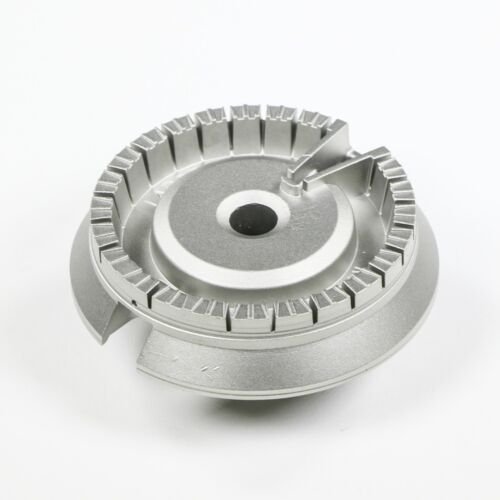
GE HOTPOINT RANGE/OVEN/COOKTOP LARGE BURNER HEAD – WB18X21512
$20.08
- Genuine OEM Quality: These parts are manufactured by the same company that made your appliance, ensuring compatibility and performance.
- Perfect Fit: OEM parts are designed to fit your specific appliance model perfectly, reducing the need for modifications or adjustments.
- Optimal Performance: OEM parts deliver the same level of performance and efficiency as the original components, maintaining your appliance’s functionality.
Available on backorder
General Electric – Hotpoint Range Oven Cooktop Large Burner Head WB18X21512We are a Factory Authorized Parts Distributor for General Electric. Trust us for all of your General Electric appliance parts and accessories needs. DIY Replace the General Electric – Hotpoint Range Oven Cooktop Large Burner Head (WB18X21512)
Tools and Materials Needed:
• Replacement Burner head for WB18X21512
• Screwdriver
• Wire brush
• Safety gloves
Instructions:
1. Unplug the oven from the power outlet to cut off any electricity. Make sure the oven is cool before beginning work.
2. Put on safety gloves to protect your hands while working.
3. Use a screwdriver to remove any screws that may be holding the burner head in place.
4. Lift out the burner head and inspect the contacts. If there are any signs of burning or damage, replace the contacts as well.
5. Use a wire brush to clean the area around the burner head to ensure proper installation of the new unit.
6. Place the new burner head in position and secure it with the screws that were removed in step 3.
7. Make sure the contacts and wires are properly connected.
8. Plug the oven back into the outlet and turn it on.
9. Check to make sure the burner head is working correctly.
10. If everything is working correctly, enjoy your newly replaced oven burner head.
Please keep in mind, these instructions are for general guidance and should always be used in conjunction with the manufacturer’s manual, if available. No more associated models for this part.
Only logged in customers who have purchased this product may leave a review.
Related products

Reviews
There are no reviews yet.