






















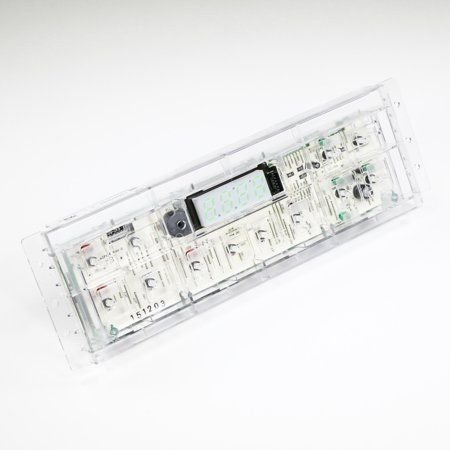
GE RANGE OVEN CONTROL BOARD TO9 – WB18X20153
$234.00
- Genuine OEM Quality: These parts are manufactured by the same company that made your appliance, ensuring compatibility and performance.
- Perfect Fit: OEM parts are designed to fit your specific appliance model perfectly, reducing the need for modifications or adjustments.
- Optimal Performance: OEM parts deliver the same level of performance and efficiency as the original components, maintaining your appliance’s functionality.
Available on backorder
Oven control board to9 works with some GE, and Hotpoint models of stoves / ovens / ranges. Replacing the WB18X20153 GE Range Oven Control Board TO9
DIY Instructions
1. Begin by unplugging your range from the wall outlet to avoid any potential electrical shock or short circuit.
2. Locate the rear access panel at the back of the range. This is usually held in place by two screws; use a screwdriver to remove them and set them aside.
3. With the panel removed, locate the existing control board. It is likely to be screwed into place so unscrew it using the same screwdriver.
4. Now take your new control board and insert it into the space where the old board was. Secure it using the screws you previously removed.
5. Connect the wiring harnesses to the new board. Refer to the user manual to ensure that the wires are connected correctly.
6. Once this is done, carefully lower the back access panel back into its original position. Secure it with the two screws.
7. Finally, plug your range back into the wall outlet to restore power. The new control board should now be operational.
Please keep in mind, these instructions are for general guidance and should always be used in conjunction with the manufacturer’s manual, if available. Search JB630DF5BB JB250DF5CC JB250DF5BB JB250DF1CC JB640SF6SS JB640DF6WW JB640DF6CC JB640DF6BB JB630DF5WW JB250DF5WW JB250RK1SS JB630RF4SS JB620RF4SS JB620GF4SA JB620DF4WW JB620DF4BB JB250DF4WW JB250DF4CC JB250DF6BB JB250DF6CC JB250DF6WW JB250GF4SA JB250GF5SA JB250GF6SA JB250RF1SS JB250RK2SS JB620DF1BB JB620DF2BB JB620DF2WW JB620GF2SA JB620RF1SS JB630DF2BB JB630RF5SS JB620RF2SS JB250DF1WW JB250DF2BB JB250DF2WW JB250DIF1WW JB250GF1SA JB250RIF1SS 1 2
Only logged in customers who have purchased this product may leave a review.

Reviews
There are no reviews yet.