






















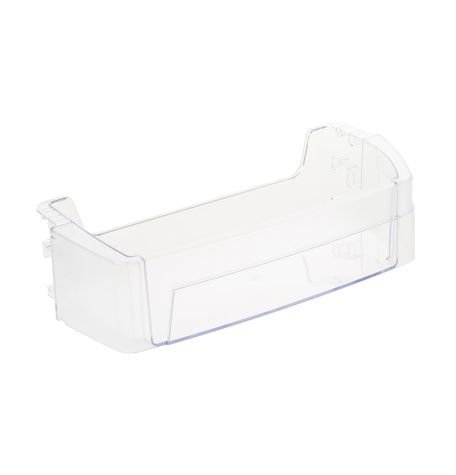
GE REFRIGERATOR SHELF MODULE FF – WR71X38318
$41.85
- Genuine OEM Quality: These parts are manufactured by the same company that made your appliance, ensuring compatibility and performance.
- Perfect Fit: OEM parts are designed to fit your specific appliance model perfectly, reducing the need for modifications or adjustments.
- Optimal Performance: OEM parts deliver the same level of performance and efficiency as the original components, maintaining your appliance’s functionality.
Available on backorder
This is a genuine OEM part that works for some models of GE, and Hotpoint models. Replacing the GE WR71X38318 Shelf Module FF
1. Before you begin, make sure that your appliance is unplugged and the power source has been switched off.
2. Remove all of the items from the shelf.
3. Locate the screws that attach the shelf module to the side of the refrigerator. Use a screwdriver to remove the screws.
4. Slide the shelf module out of the refrigerator.
5. Carefully examine the new shelf module to ensure it is compatible with your appliance.
6. Place the new shelf module into the refrigerator and line it up with the existing holes.
7. Reattach the screws using your screwdriver.
8. Place all items back on the shelf.
9. Plug the power source back in and switch on the power.
10. Your appliance is now ready to use with its new shelf module.
Please keep in mind, these instructions are for general guidance and should always be used in conjunction with the manufacturer’s manual, if available. Search GZS22DGJKFBB GSS25IGNEHBB GSS25IGNEHWW GSS25IYNPHFS GSS25LSLECSS GSS25LSLHCSS GSS25LSLKCSS GSS25LSLNCSS GSS25LSLPCSS GZS22DGJBFBB GZS22DGJBFWW GZS22DGJCFBB GZS22DGJCFWW GZS22DGJEFBB GZS22DGJEFWW GSS25IENBHDS GZS22DGJKFWW GZS22DGJPFBB GZS22DGJPFWW GZS22DMJBFES GZS22DMJEFES GZS22DMJKFES GZS22DMJPFES GZS22DSJBFSS GZS22DSJEFSS GZS22DSJKFSS GZS22IENPHDS GZS22IMNBHES GZS22IYNBHFS GZS22IYNPHFS GSS25IYNEHFS GZS22DSJCFSS GZS22DGJJFWW GZS22DMJJFES GZS22DGJJFBB GZS22DSJJFSS GSS25IMNBHES GSS25IYNBHFS GSS25IGNBHBB GSS25IGNBHWW 1 2
Only logged in customers who have purchased this product may leave a review.




Reviews
There are no reviews yet.