






















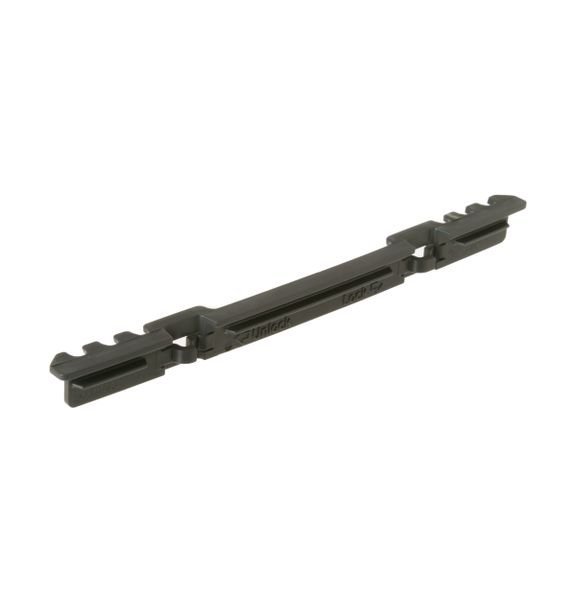
GE TINE CLIP – WD28X20166
$15.00
- Genuine OEM Quality: These parts are manufactured by the same company that made your appliance, ensuring compatibility and performance.
- Perfect Fit: OEM parts are designed to fit your specific appliance model perfectly, reducing the need for modifications or adjustments.
- Optimal Performance: OEM parts deliver the same level of performance and efficiency as the original components, maintaining your appliance’s functionality.
Available on backorder
The GE WD28X20166 INDEXER helps improve your kitchen and laundry room organization. The indexer is designed to pair perfectly with multiple drawer systems, including GE Monogram, Profile and Café refrigerator drawers. This indexer provides organized storage for up to 15 items, such as condiments and spices, baking supplies, snacks, or small items you’d want nearby for convenience. The included rubber feet prevent items from sliding or tipping and protect the bottom of your drawers from scratches or damage. Plus, this indexer is designed with a clear lid so you can easily see what is inside each drawer and quickly access the items you need. It’s an ideal solution for effortlessly organizing your kitchen and laundry room. We’re your #1 source for genuine OEM appliance parts. Contact us for further questions as well as any other appliance parts needs! How to Replace the GE WD28X20166 INDEXER
Replacing a broken indexer in your GE dishwasher can be a difficult task. However, if you have some basic DIY skills and follow these instructions carefully, you can get it done quickly and safely.
What You’ll Need:
• Replacement GE WD28X20166 Indexer
• Wrench
• Screwdriver
Step 1: Unplug Your Dishwasher
Before beginning any repair work, make sure to unplug your dishwasher from the power outlet, this will prevent accidents and keep you safe during the repair process.
Step 2: Remove the Access Panel
The GE WD28X20166 indexer is located behind the access panel. Use a wrench to remove any screws holding the access panel in place, then carefully lift it off.
Step 3: Locate the Old Indexer
The indexer is a small box-like device that sits inside the dishwasher. Remove any screws that are holding it in place, and gently pull it out of the compartment.
Step 4: Install the New Indexer
Carefully place the replacement WD28X20166 indexer into the compartment and use a screwdriver to secure it in place.
Step 5: Replace the Access Panel
Reattach the access panel and use a wrench to tighten any screws holding it in place.
Step 6: Plug in Your Dishwasher
Plug your dishwasher back into the power outlet and turn it on to test the new indexer.
By following these instructions, you should be able to safely and easily replace the GE WD28X20166 indexer in your dishwasher. If you experience any complications or have any questions along the way, be sure to contact a professional for assistance.
Please keep in mind, these instructions are for general guidance and should always be used in conjunction with the manufacturer’s manual, if available. Search DDT595SSJ5SS GDT655SBL5TS GDT655SSJ5SS CDT835SMJ5DS DDT595SFL5DS DDT595SGJ5WW GDF650SMJ5ES DDT595SGJ5BB DDT595SMJ5ES DDT595SBL5TS GDF650SFJ5DS GDT655SGJ5BB GDT655SMJ5ES GDF650SGJ5WW GDF650SSJ5SS GDT655SFL5DS PDF820SGJ5BB GDT695SSJ5SS GDT695SMJ5ES PDF820SGJ5WW GDT695SFL5DS PDT825SGJ5WW PDT825SSJ5SS GDT695SGJ5BB GDT695SGJ5WW GDT695SBL5TS PDF820SSJ5SS PDT825SGJ5BB CDT835SSJ5SS GDT655SGJ5WW GDF650SGJ5BB GDP695SSM5SS GDP695SBM5TS PDT750SSF2SS CDT725SSF2SS GDT740SIF0II PDT760SSF0SS GDT580SGF2WW GDT580SMF2ES CDT765SSF1SS 1 2 3 4 5
Only logged in customers who have purchased this product may leave a review.
Related products

Reviews
There are no reviews yet.