























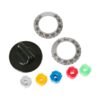
GE UNIVERSAL ELECTRIC OVEN KNOB KIT – PM3X122
$19.76
- Genuine OEM Quality: These parts are manufactured by the same company that made your appliance, ensuring compatibility and performance.
- Perfect Fit: OEM parts are designed to fit your specific appliance model perfectly, reducing the need for modifications or adjustments.
- Optimal Performance: OEM parts deliver the same level of performance and efficiency as the original components, maintaining your appliance’s functionality.
Available on backorder
GE General Electric Universal Electric Oven Knob Kit PM3X122Fits many brands of appliances DIY Instructions for Replacing the PM3X122 GE General Electric Universal Electric Oven Knob Kit
1. Begin by unplugging your oven from the electrical socket to ensure it is completely powered off before starting.
2. Remove the existing knob by pulling it gently straight off the control.
3. Check the shaft of the knob, if there is an adapter plate over the shaft, remove it.
4. Take the new PM3X122 GE General Electric Universal Electric Oven Knob Kit and place it over the shaft.
5. Push the knob onto the shaft until it clicks into place.
6. To complete installation, plug the oven back in.
7. Test the new knob by turning the burner on and off.
Congratulations! You have now successfully replaced the PM3X122 GE General Electric Universal Electric Oven Knob Kit.
Please keep in mind, these instructions are for general guidance and should always be used in conjunction with the manufacturer’s manual, if available. No more associated models for this part.
Only logged in customers who have purchased this product may leave a review.
Related products

Reviews
There are no reviews yet.