






















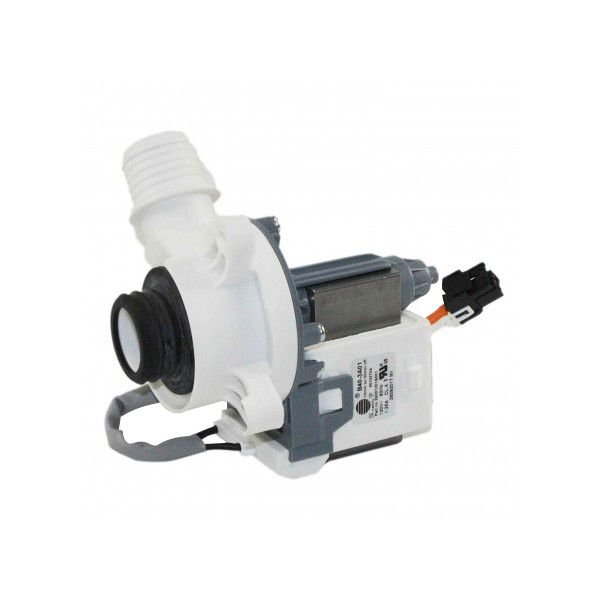
GE WASHER DRAIN PUMP ASSEMBLY – WH23X28418
$66.33
- Genuine OEM Quality: These parts are manufactured by the same company that made your appliance, ensuring compatibility and performance.
- Perfect Fit: OEM parts are designed to fit your specific appliance model perfectly, reducing the need for modifications or adjustments.
- Optimal Performance: OEM parts deliver the same level of performance and efficiency as the original components, maintaining your appliance’s functionality.
Available on backorder
Drain pump assembly works with some GE, and Hotpoint models of washing machines. DIY Guide to Replacing the WH23X28418 GE Washer Drain Pump Assembly
This guide will provide step-by-step instructions on how to replace your WH23X28418 GE Washer Drain Pump Assembly.
Step 1: Unplug your power cord from the wall socket.
Step 2: Disconnect the water lines by loosening the hose clamps and removing the hoses connected to the drain pump.
Step 3: Locate the three screws that secure the drain pump to the washer’s base.
Step 4: Using a pair of pliers, remove the screws and carefully remove the drain pump from the washer.
Step 5: Take the new drain pump and identify where it connects to the washer’s base.
Step 6: Secure the connection with the three screws removed in step 3.
Step 7: Reconnect the hoses to the new drain pump and tighten the hose clamps.
Step 8: Plug the power cord back into the wall socket.
Step 9: Start a cycle using the same settings as your previous cycle.
If you have successfully followed these steps, then your WH23X28418 GE Washer Drain Pump Assembly should now be safely replaced.
Please keep in mind, these instructions are for general guidance and should always be used in conjunction with the manufacturer’s manual, if available. Search GTW725BSN0WS GTW220ACK6WW GTW465ASN1WW GTW845CSN0WS GTW840CPN0DG GTW845CPN0DG YTW4514PN0DG GTW335ASN1WW GTW460ASJAWW GTW525ACP0WB GTW720BSN0WS GTW725BPN0DG GTW840CSN0WS HTW240ASK5WS YTW4514SN0WS
Only logged in customers who have purchased this product may leave a review.
Related products

Reviews
There are no reviews yet.