






















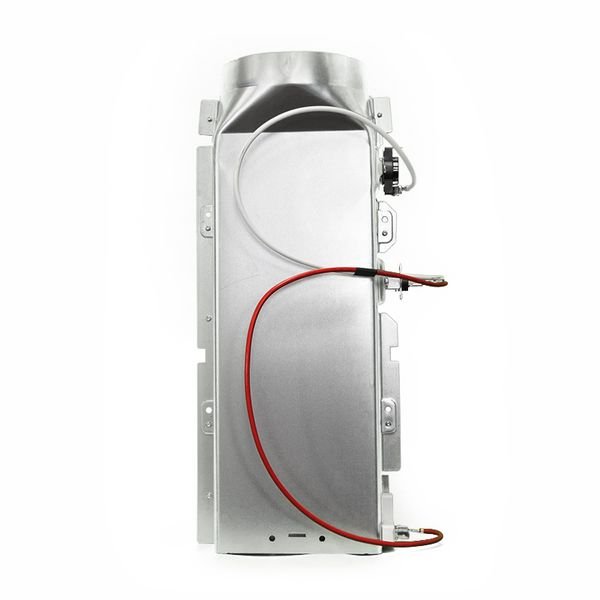
LG DRYER HEATER ELEMENT ASSEMBLY – 5301EL1001J
$302.49
- Genuine OEM Quality: These parts are manufactured by the same company that made your appliance, ensuring compatibility and performance.
- Perfect Fit: OEM parts are designed to fit your specific appliance model perfectly, reducing the need for modifications or adjustments.
- Optimal Performance: OEM parts deliver the same level of performance and efficiency as the original components, maintaining your appliance’s functionality.
Available on backorder
LG Sears Kenmore Clothes Dryer HEATER ELEMENT ASSEMBLY 5301EL1001J 1. Unplug your LG dryer and locate the 5301EL1001J Heater Element Assembly, which will be located beneath the drum and next to the bulkhead.
2. Gently pull the drum away from the bulkhead in order to access the back side of the Heater Element Assembly.
3. Disconnect the two wiring leads connected to the Heater Element Assembly.
4. Remove the screws that hold the old assembly in place, using a Phillips-head screwdriver.
5. Lift the old Heater Element Assembly out of its housing and discard it.
6. Clean the area of any dust, lint or debris before placing the new Heater Element Assembly.
7. Place the new Heater Element Assembly in its housing, ensuring it’s properly secured with the screws you removed from the old assembly.
8. Connect the two wiring leads to the new Heater Element Assembly.
9. Push the drum back against the bulkhead, ensuring the connections remain in place.
10. Plug in the power cord again and power up the dryer to test the new Heater Element Assembly.
Please keep in mind, these instructions are for general guidance and should always be used in conjunction with the manufacturer’s manual, if available. Search DLEX8500V DLEX9000W DLEX9500K DLEX9500V GDL1329CED7 GDL1329CEW7 GDL1329QEW7 GDP1329CES GDP1329CES2 GDP1329CEW GDP1329QED GDP1329QES GDP1329QEW2 RV1356ES DLEX5005K DLEX7700KE DLEX7700VE DLEX7700WE DLEX7710VE DLEX7710WE DLEX8000V DLEX8000W DLEX8100V DLEX8100W DLEX3370R DLEX3370V DLEX3370W DLEX3700V DLEX3700W DLEX4070W DLEX4270V DLEX4270W DLEX4370K DLEX4370W DLEX4500B DLEX5000V DLEX5000W DLE3050W DLE3460V DLE3460W 1 2
Only logged in customers who have purchased this product may leave a review.
Related products


Reviews
There are no reviews yet.