






















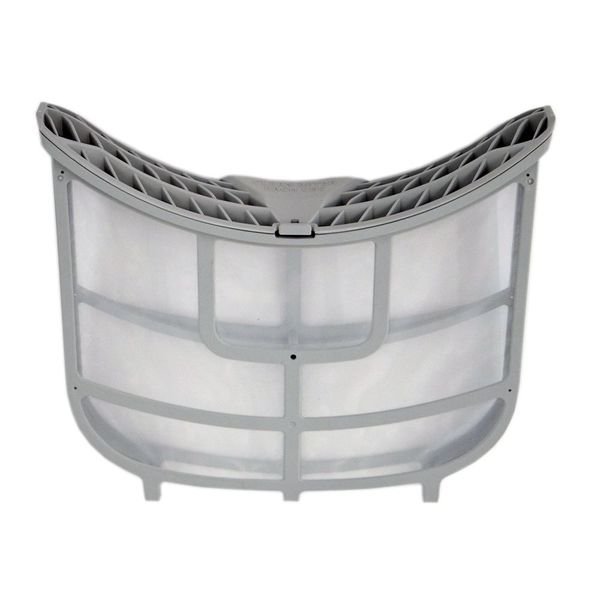
LG DRYER LINT SCREEN FILTER ASSEMBLY – ADQ73373201
$71.59
- Genuine OEM Quality: These parts are manufactured by the same company that made your appliance, ensuring compatibility and performance.
- Perfect Fit: OEM parts are designed to fit your specific appliance model perfectly, reducing the need for modifications or adjustments.
- Optimal Performance: OEM parts deliver the same level of performance and efficiency as the original components, maintaining your appliance’s functionality.
Available on backorder
LG Electronics Sears Kenmore Clothes Dryer Lint Filter Screen ADQ73373201We are a Factory Authorized Distributor for LG Electronics appliance parts (out of product warranty parts only). Trust us for all of your LG Electronics appliance parts and accessories needs. Replacing the ADQ73373201 Lint Screen Filter Assembly on Your LG Dryer
1. Unplug your dryer from the power source and then slide it away from the wall.
2. Remove the lint filter cover. The filter cover is located inside your dryer, in the front left corner of the dryer drum. Use a flat head screwdriver to remove the screws on either side of the filter cover. Lift the filter cover off the dryer.
3. Locate the lint filter assembly. The filter assembly is located underneath the filter cover, attached to the interior wall of the dryer.
4. Remove the old lint filter. Pull the filter straight out of its housing.
5. Install the new lint filter. Slide the new filter into the filter housing, making sure it’s securely in place.
6. Replace the filter cover. Align the filter cover over the lint filter housing and replace the screws you removed earlier.
7. Plug in your dryer and slide it back against the wall.
Congratulations! You have successfully replaced the ADQ73373201 lint filter assembly on your LG Dryer.
Please keep in mind, these instructions are for general guidance and should always be used in conjunction with the manufacturer’s manual, if available. Search 81072 81073 81962 81963 81982 81983 91072 91073 91962 91963 91982 91983 DLEX5005K DLEX8000V DLEX8000W DLEX8100V DLEX5000V DLEX5000W DLGX5001V DLGX5001W DLGX9001W DLGX9501K DLGX9501V DLEX8100W DLEX8500V DLEX9000W DLEX9500K DLEX9500V DLGX5006K DLGX8001V DLGX8101V DLGX8101W
Only logged in customers who have purchased this product may leave a review.

Reviews
There are no reviews yet.