






















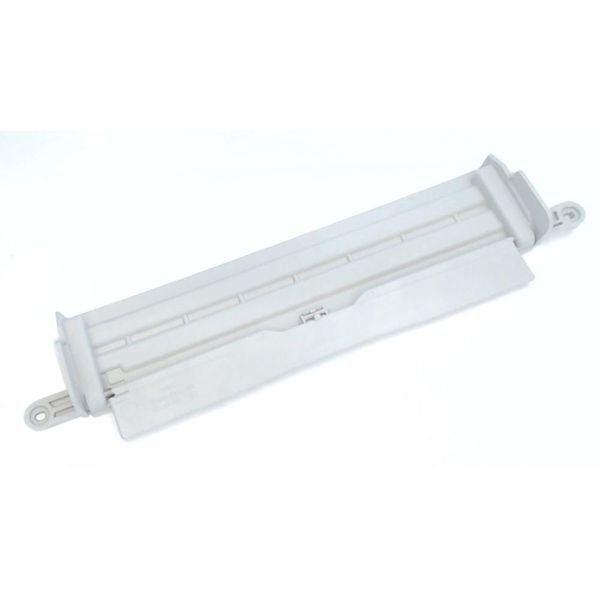
LG DRYER LINT SCREEN GUIDE FILTER COVER – 3550EL2004B
$19.61
- Genuine OEM Quality: These parts are manufactured by the same company that made your appliance, ensuring compatibility and performance.
- Perfect Fit: OEM parts are designed to fit your specific appliance model perfectly, reducing the need for modifications or adjustments.
- Optimal Performance: OEM parts deliver the same level of performance and efficiency as the original components, maintaining your appliance’s functionality.
Available on backorder
Lint screen guide filter cover for some models of LG dryers. Step 1: Unplug the LG dryer from the wall outlet or disconnect it from the power supply to ensure that it does not turn on while you are replacing the lint screen guide filter cover.
Step 2: Open the dryer door and locate the lint screen guide filter cover – it should be located in the upper left corner of the dryer interior.
Step 3: Remove the screws from the lint screen guide filter cover, using a Phillips head screwdriver.
Step 4: Lift the lint screen guide filter cover off the dryer interior, then discard the old filter.
Step 5: Insert the new lint screen guide filter cover. Secure it in place with the screws you removed in Step 3.
Step 6: Reconnect the dryer to the power supply or plug it back into the wall outlet.
Your LG Dryer 3550EL2004B is now ready to use with a new lint screen guide filter cover.
Please keep in mind, these instructions are for general guidance and should always be used in conjunction with the manufacturer’s manual, if available. Search 61422 61423 61433 61462 61463 61523 61552 61553 61622 61623 71423 71433 71462 71463 71522 71552 71553 DLEY1201V DLEY1201W DLEY1701V DLEY1701W DLEY1701WE DLEY1901KE DLEY1901WE DLG1002F DLG1002W DLG1502W DLG4971WE DLG7001W DLG7051V DLGX7601KE DLGX7601VE DLGX7601WE DLGX7701KE DLGX7701VE DLGX7701WE DLGX7711VE DLGX7711WE DLGX7801VE DLGX7801WE 1 2 3
Only logged in customers who have purchased this product may leave a review.
Related products


Reviews
There are no reviews yet.