























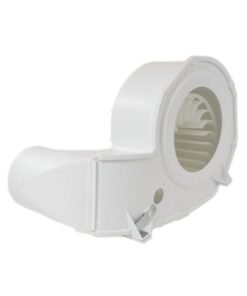
LG DRYER LINT SCREEN GUIDE – MEA49050001
$19.61
- Genuine OEM Quality: These parts are manufactured by the same company that made your appliance, ensuring compatibility and performance.
- Perfect Fit: OEM parts are designed to fit your specific appliance model perfectly, reducing the need for modifications or adjustments.
- Optimal Performance: OEM parts deliver the same level of performance and efficiency as the original components, maintaining your appliance’s functionality.
Available on backorder
LG Electronics Sears Kenmore Clothes Dryer LINT SCREEN GUIDE MEA49050001 Replacing the MEA49050001 LG Dryer Lint Screen Guide
1. Unplug your LG dryer from the wall before beginning any repair procedure.
2. Pull the lint screen out of its housing on the front of the dryer.
3. Use a flat-blade screwdriver to remove the two screws securing the lint screen guide.
4. Carefully pull the guide out of the front of the dryer.
5. Insert the new guide into the front of the dryer and secure with the two screws you removed in step 3.
6. Put the lint screen back into its housing, being sure to slide it in all the way.
7. Plug the dryer back in and test to make sure the guide is securely in place.
8. Clean the lint screen and housing regularly to prevent further damage to the guide or build-up of lint.
Please keep in mind, these instructions are for general guidance and should always be used in conjunction with the manufacturer’s manual, if available. Search 48231014465 81182 81282 81283 81382 81383 81582 81583 DLE3050W DLE3170W DLE3180W DLE3400W DLE3460V DLE3460W DLE3500W DLE3600V DLE3600W DLEX3370R DLEX3370V DLEX3370W DLEX3570V DLEX3570W DLEX3700V DLEX3700W DLEX3900B DLEX3900K DLEX3900W DLEX4070W DLEX4200B DLEX4270V DLEX4270W DLEX4370K DLEX4370W DLEX4500B DLG3181W DLG3401W DLG3461V DLG3461W DLG3501W DLG3601V 1 2
Only logged in customers who have purchased this product may leave a review.
Related products



Reviews
There are no reviews yet.