






















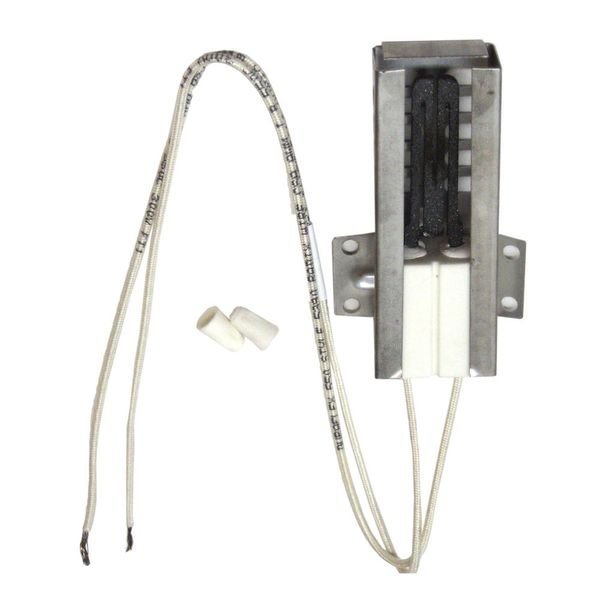
LG RANGE STOVE OVEN BURNER IGNITOR – MEE61841401
$234.07
- Genuine OEM Quality: These parts are manufactured by the same company that made your appliance, ensuring compatibility and performance.
- Perfect Fit: OEM parts are designed to fit your specific appliance model perfectly, reducing the need for modifications or adjustments.
- Optimal Performance: OEM parts deliver the same level of performance and efficiency as the original components, maintaining your appliance’s functionality.
Available on backorder
LG Electronics Sears Kenmore Range Stove Oven BURNER IGNITOR MEE61841401 Step 1: Begin by unplugging the range or turning off the breaker for the oven.
Step 2: Remove the oven door. To do this, open the oven door and on the bottom of the door, there will be two screws. Unscrew these and remove the door from the hinges.
Step 3: Locate the igniter. It will be a cylinder-shaped piece of metal located near the burner port.
Step 4: Disconnect the wiring at the terminal connection points. Using your fingers, gently pull apart the wires to disconnect them.
Step 5: Remove the burner igniter. Take note of the location of the screws and remove them. Carefully pull out the igniter, taking care not to damage any other parts in the process.
Step 6: Install the new burner igniter. Ensure that the mounting screws are placed into their corresponding holes. Plug in the wiring connections and attach them securely to their terminals.
Step 7: Reattach the oven door. Place the door back onto the hinges and secure it with the screws.
Step 8: Test the new igniter. Turn the oven on and set the temperature to 350 degrees. If the burner igniter lights up, then the installation was successful.
Please keep in mind, these instructions are for general guidance and should always be used in conjunction with the manufacturer’s manual, if available. Search LRG3194BM LRG4115ST LRGL5821S LSG4513BD LSG4515BM LSGL5833F LUTG4519SN SKSDR360GS SKSGR360GS SKSGR360S UPSG3014ST
Only logged in customers who have purchased this product may leave a review.
Related products

Reviews
There are no reviews yet.