






















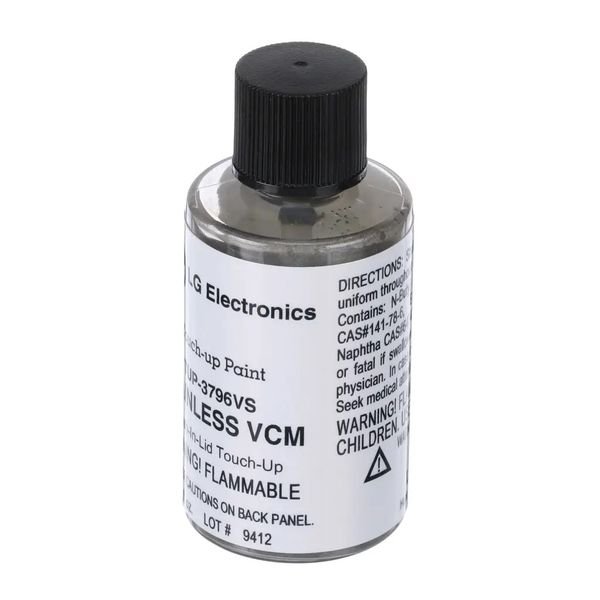
LG REFRIGERATOR TOUCH-UP PAINT (VCM STAINLESS) – TUP-3796VS
$20.86
- Genuine OEM Quality: These parts are manufactured by the same company that made your appliance, ensuring compatibility and performance.
- Perfect Fit: OEM parts are designed to fit your specific appliance model perfectly, reducing the need for modifications or adjustments.
- Optimal Performance: OEM parts deliver the same level of performance and efficiency as the original components, maintaining your appliance’s functionality.
Available on backorder
LG Electronics Sears Kenmore Stainless VCM Appliance Touch-Up Paint TUP-3796VS DIY Instructions for Replacing the LG Appliance TUP-3796VS Touch-Up Paint, VCM Stainless Steel
1. Prepare your workspace by clearing the area and laying down a protective surface such as newspaper or a drop cloth.
2. Locate the damaged area on the appliance and check the original color of the paint with a reference guide.
3. Gather the necessary supplies for the job such as a small screw driver, a putty knife, soap and water, a clean rag, and the TUP-3796VS LG Appliance Touch-Up Paint in VCM Stainless Steel.
4. Use the putty knife to remove any old paint and/or rust that may be on the affected area.
5. Use soap and water and a clean rag to thoroughly clean the area.
6. Shake the TUP-3796VS LG Appliance Touch-Up Paint can thoroughly before opening.
7. Open the can and use the small screw driver to punch a small hole in the top of the can.
8. Dip a clean cloth or a fine brush into the paint and apply a thin coat to the area.
9. Allow the touch up paint to dry overnight.
10. Inspect your work and if it is satisfactory you have completed replacing the TUP-3796VS LG Appliance Touch-Up Paint, VCM Stainless Steel.
Please keep in mind, these instructions are for general guidance and should always be used in conjunction with the manufacturer’s manual, if available. No more associated models for this part.
Only logged in customers who have purchased this product may leave a review.



Reviews
There are no reviews yet.