






















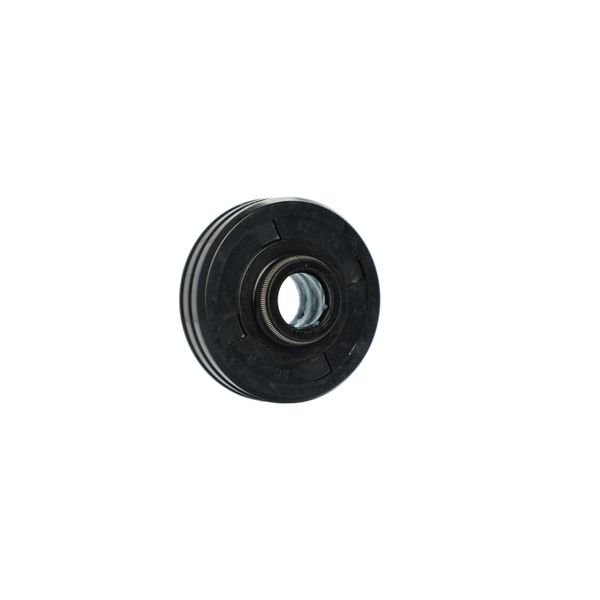
SAMSUNG DISHWASHER MOTOR PUMP OIL SHAFT SEAL – DD62-00053A
$52.50
- Genuine OEM Quality: These parts are manufactured by the same company that made your appliance, ensuring compatibility and performance.
- Perfect Fit: OEM parts are designed to fit your specific appliance model perfectly, reducing the need for modifications or adjustments.
- Optimal Performance: OEM parts deliver the same level of performance and efficiency as the original components, maintaining your appliance’s functionality.
Available on backorder
Motor pump oil shaft seal for some models of Samsung dishwashers. Step by Step Guide to Replacing the DD62-00053A Samsung Dishwasher Motor Pump Oil Shaft Seal
1. Turn off the power to the dishwasher at the circuit breaker and unplug the unit. If the dishwasher is connected directly to a wall outlet, turn off the breaker controlling that outlet.
2. Pull the dishwasher away from the wall and remove the lower access panel.
3. Locate the motor pump. It will be located on the bottom of the dishwasher, near the back.
4. Place a towel or other absorbent material on the ground beneath the pump to catch any spilled water.
5. Loosen the four screws that hold the motor pump in place with a screwdriver.
6. Disconnect the power wires from the motor pump.
7. Remove the old oil shaft seal from the motor pump. Clean the area around the seal thoroughly with a rag or cotton swab.
8. Place the new oil shaft seal into the motor pump.
9. Re-attach the power wires to the motor pump.
10. Tighten the four screws that hold the motor pump in place.
11. Replace the lower access panel and push the dishwasher back into place.
12. Plug the unit back in and turn on the power at the circuit breaker.
Congratulations! You have successfully replaced the DD62-00053A Samsung Dishwasher Motor Pump Oil Shaft Seal.
Please keep in mind, these instructions are for general guidance and should always be used in conjunction with the manufacturer’s manual, if available. Search DMR57LFB/XAA-00 DMR57LFS/XAA-00 DMR57LFW/XAA-00 DMR78AHB/XAA-00 DMT300RFB/XAA DMT400RHB/XAA DMT400RHS/XAA DMT800RHB/XAA DW7933LRABB/AA-01 DW80F600UTS/AA
Only logged in customers who have purchased this product may leave a review.
Related products

Reviews
There are no reviews yet.