






















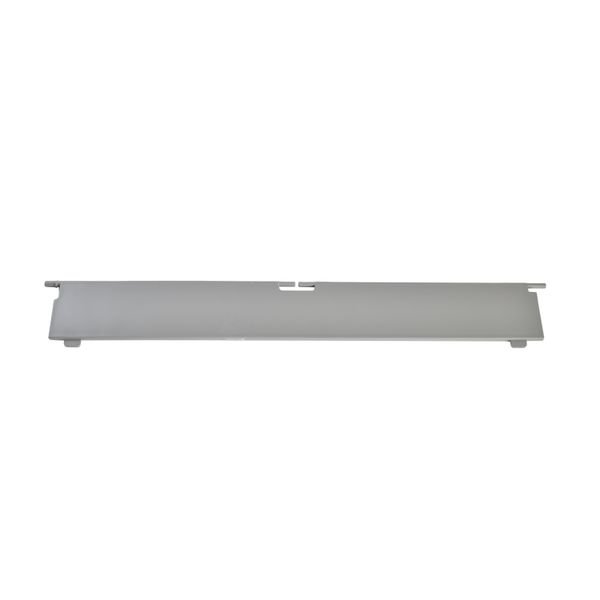
SAMSUNG DRYER LINT FILTER SCREEN COVER – DC63-01140A
$20.42
- Genuine OEM Quality: These parts are manufactured by the same company that made your appliance, ensuring compatibility and performance.
- Perfect Fit: OEM parts are designed to fit your specific appliance model perfectly, reducing the need for modifications or adjustments.
- Optimal Performance: OEM parts deliver the same level of performance and efficiency as the original components, maintaining your appliance’s functionality.
Available on backorder
Dryer cover upper filter for some models of Samsung clothes dryers. How to Replace the DC63-01140A Samsung dryer lint filter screen cover
1. Unplug your dryer from the wall socket and turn off the gas valve if applicable.
2. Slide out the dryer and locate the filter housing. Depending on your model, the housing may be located at the top or bottom of the dryer.
3. Use a Phillips screwdriver to unscrew the screws that hold the filter housing in place. Carefully remove the housing and set it aside.
4. Pull out the old lint filter screen cover and discard it. Inspect the surrounding area for any lint buildup or debris and clean it away.
5. Place the new lint filter screen cover in the slot and secure it using the screws you removed earlier.
6. Reattach the filter housing and plug the dryer back into the wall socket. If you have a gas dryer, turn the gas valve back on.
7. Test the dryer to make sure everything is working properly.
Congratulations! You have now successfully replaced the DC63-01140A Samsung dryer lint filter screen cover.
Please keep in mind, these instructions are for general guidance and should always be used in conjunction with the manufacturer’s manual, if available. Search DV520AGP/XAA-02 DV50K7500EV/A3-01 DV50K7500GV/A3-00 DV50K7500GV/A3-01 DV511AER/XAA-00 DV511AER/XAA-01 DV511AER/XAA-02 DV520AEP/XAA-00 DV520AEP/XAA-01 DV520AEP/XAA-02 DV520AGP/XAA-00 DV520AGP/XAA-01 DV50K7500EV/A3-00 DV520AGP/XAA-03 DV520AGP/XAA-04 DVE45M5500P/A3-00 DVE45A6400W/A3 DVE50BG8300EA3 DVE50BG8300VA3 DVG45T6000P/A3 DVG50BG8300EA3 DVG50BG8300VA3 DVG60M9905V/A3 DV433GTGJWR/A1-01 DV42H5000EW/A3-01 DV42H5000EW/A3-02 DV42H5000EW/A3-03 DV42H5200EF/A3-00 DV42H5200EP/A3-00 DV42H5200EW/A3-00 DV42H5400EF/A3-00 DV42H5400GF/A3-00 DV42H5600EP/A3-00 DV433ETGJWR/A1-00 DV433GTGJWR/A1-00 DV42H5000EW/A3-00 DV435ETGJRA/A1-01 DV457EVGSGR/AA-00 DV457GVGSGR/AA-00 DV457GVGSGR/AA-02 1 2
Only logged in customers who have purchased this product may leave a review.



Reviews
There are no reviews yet.