






















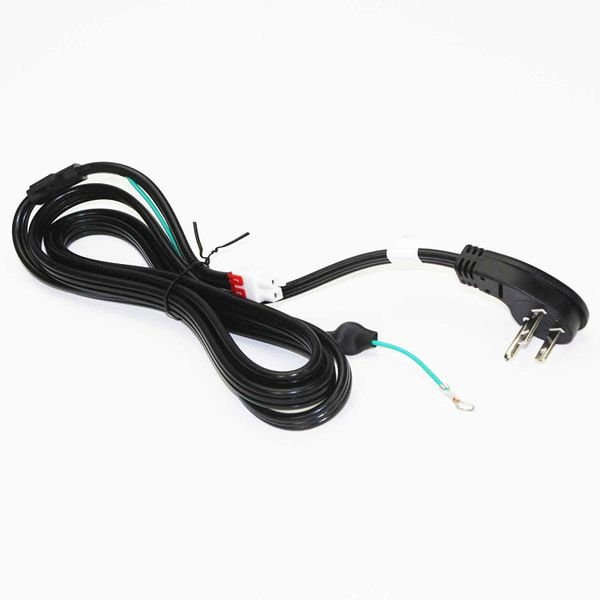
SAMSUNG REFRIGERATOR CBF-POWER CORD – 3903-001003
$69.15
- Genuine OEM Quality: These parts are manufactured by the same company that made your appliance, ensuring compatibility and performance.
- Perfect Fit: OEM parts are designed to fit your specific appliance model perfectly, reducing the need for modifications or adjustments.
- Optimal Performance: OEM parts deliver the same level of performance and efficiency as the original components, maintaining your appliance’s functionality.
Available on backorder
CBF-Power Cord works with some models of Samsung Refrigerators 1. Disconnect the refrigerator from the power source by unplugging it from the wall outlet.
2. Make sure to unplug the existing CBF-Power Cord from the back of the refrigerator and remove from the wall receptacle.
3. Locate the new Samsung Refrigerator CBF-Power Cord and make sure it is the same wattage and voltage as the existing CBF-Power Cord.
4. Carefully thread the new CBF-Power Cord through the back of the refrigerator and make sure to secure the cord with cable ties or electrical tape for optimal safety.
5. Connect the new CBF-Power Cord to the wall outlet.
6. Plug the new CBF-Power Cord into the back of the refrigerator.
7. Securely fasten the ground wire in place if the cord has one.
8. Press the reset button, located on the side of the refrigerator, to ensure optimal operation.
9. Check to make sure the refrigerator is now powered on and operational.
10. Test the temperature settings to ensure they are accurate.
11. Finally, check the power outlets and other components to make sure everything is correctly connected.
By following these simple steps, you can easily replace the 3903-001003 Samsung Refrigerator CBF-Power Cord.
Please keep in mind, these instructions are for general guidance and should always be used in conjunction with the manufacturer’s manual, if available. Search RF28T5001SR/AA RF29A967541/AA RF29A967535/AA RF29A967512/AA RF29A9671SR/AA RF29A9671SG/AA RF29A9071SR/AA RF29A9071SG/AA RF28T5101SR/AA RF28T5101SG/AA RF28T5021SR/AA RF28T5021SG/AA RF28T5001WW/AA RF29A9675AP/AA RF28T5001SG/AA RF28R7551SR/AA RF28R7551SG/AA RF28R7351SR/AA RF28R7351SG/AA RF28R7351DT/AA RF27T5241SR/AA RF27T5241SG/AA RF27T5201WW/AA RF27T5201SR/AA RF27T5201SG/AA RF29BB8900ACAA RS22T5201SG/AA RF30BB6900AWAA RF30BB6900ACAA RF30BB69006MAA RF30BB6600QLAA RF30BB6600APAA RF30BB660012AA RF30BB6200QLAA RF30BB6200APAA RF30BB620012AA RF29BB8900AWAA RF24BB6900AWAA RF29BB89008MAA RF29BB8600QLAA 1 2 3
Only logged in customers who have purchased this product may leave a review.




Reviews
There are no reviews yet.