






















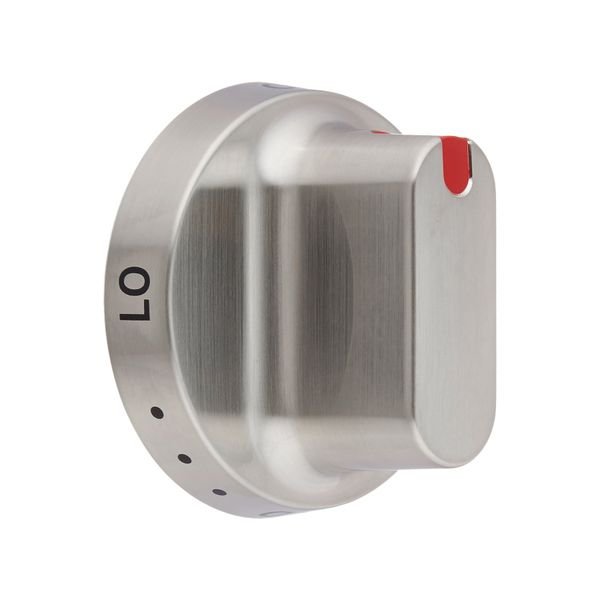
SAMSUNG STOVE RANGE OVEN TOP BURNER DIAL CONTROL KNOB – DG64-00472A
$26.58
- Genuine OEM Quality: These parts are manufactured by the same company that made your appliance, ensuring compatibility and performance.
- Perfect Fit: OEM parts are designed to fit your specific appliance model perfectly, reducing the need for modifications or adjustments.
- Optimal Performance: OEM parts deliver the same level of performance and efficiency as the original components, maintaining your appliance’s functionality.
Available on backorder
Samsung Sears Kenmore Stove Range Oven Top Burner Dial Control Knob DG64-00472A Replacing the DG64-00472A Samsung Stove Range Oven Top Burner Dial Control Knob
DIY instructions on replacing the DG64-00472A Samsung Stove Range Oven Top Burner Dial Control Knob:
1. Unplug the power from the Samsung stove range and turn off the gas supply.
2. Remove the knob by pulling it straight off the control shaft.
3. Install the new knob by pushing it onto the control shaft until it stops.
4. Make sure the knob is tightened securely.
5. Plug in the power to the Samsung stove range and turn on the gas suppply.
6. You have now successfully replaced the DG64-00472A Samsung Stove Range Oven Top Burner Dial Control Knob.
Please keep in mind, these instructions are for general guidance and should always be used in conjunction with the manufacturer’s manual, if available. Search FX510BGS/XAA-00 FX510BGS/XAA-01 FX510BGS/XAA-02 FX710BGS/XAA-00 FX710BGS/XAA-01 FX710BGS/XAA-02 FX710BGS/XAA-03 NX58F5300SS/AA-00 NX58F5300SS/AA-01 NX58F5500SS/AA-00 NX58F5500SS/AA-01
Only logged in customers who have purchased this product may leave a review.
Related products


Reviews
There are no reviews yet.