






















Informational
How to Find Appliance Parts by Model Number
Nov
How to Find the Correct Appliance Part by Model Number
Stop guessing — use the model number to order the exact replacement part and get your appliance working again on the first try.
Why the model number is the single best way to find parts
Here’s the blunt truth: two appliances that look identical might use different internal parts. Manufacturers change components across production runs, regions, and firmware versions. That’s why a photo and a vague description usually lead to the wrong part and an annoying return process.
Using the model number ensures you match the exact part spec, mounting points, and electrical connectors — which saves time, money, and frustration. In short: the model number is your shortcut to precision.
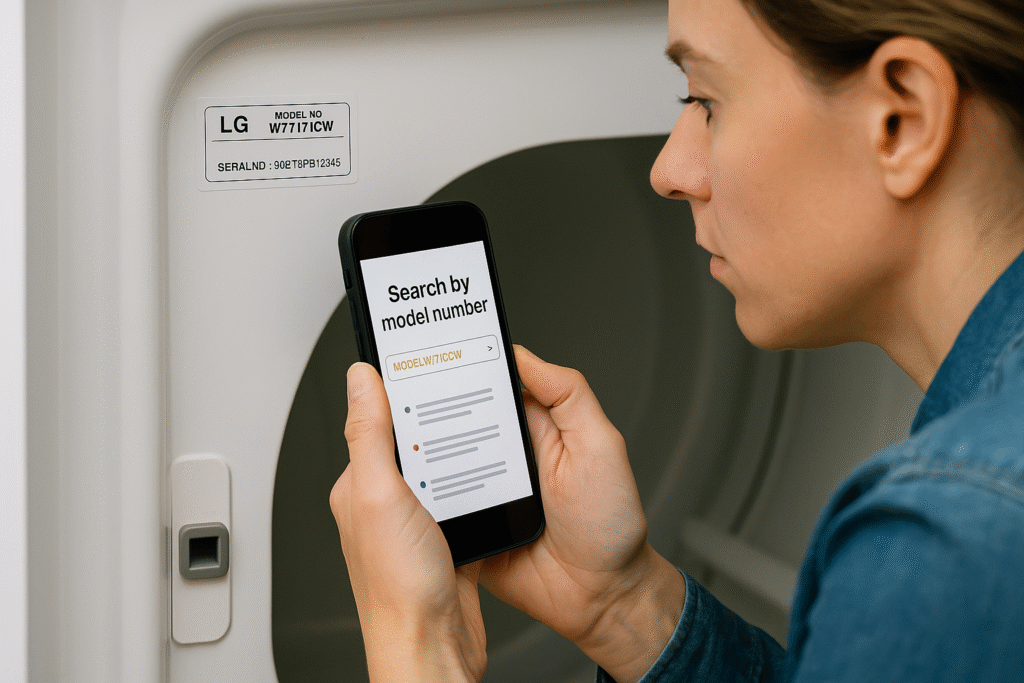
Where to find your appliance’s model and serial numbers
Different appliance types hide their labels in different spots. Check these common locations first:
- Refrigerators: On the inner door frame, on a side wall near the crisper, or on the refrigerator cabinet edge.
- Washers & Dryers: On the door jamb, inside the door frame, behind the control console, or on the rear panel.
- Dishwashers: On the top or side of the door (open the door and look at the edge).
- Ovens & Ranges: On the oven frame behind the door or on the storage drawer face.
- Microwaves: On the back panel or inside the door frame.
Pro tip: If the label is hard to read, take a close photo or use a bright flashlight — photos can be zoomed in and emailed to parts specialists for faster identification.
How to read the label (model vs. serial)
Most labels include two numbers: the model number (the important one for parts) and the serial number (useful when the part requires production-run info).
Example label breakdown:
- Model:
WFW5620HW - Serial:
602KPB123456
When ordering parts, always provide the full model number. If a part is revision-dependent (rare but it happens), the serial number helps the parts team confirm exact fitment.
Step-by-step: Use your model number to find the correct part
- Write it down or take a photo: Full model (letters + numbers) and serial if available.
- Search the model directly on RepairPartsZone: Use the site search box and paste the model number — don’t type a partial or shorthand.
- Filter by category: Narrow results to relevant categories like Control Boards, Heating Elements, Door Gaskets, etc.
- Open product pages and check compatibility notes: Many product listings show a list of compatible models or part numbers in the description.
- If uncertain, contact us: Submit a photo and the model number via our Contact Page and we’ll confirm the right SKU.
Tip for power shoppers: add model numbers to a short note or spreadsheet so you can quickly match parts across multiple appliances.
Common issues when the label is missing or unreadable
If your model label is gone or faded, try these methods:
- Check the owner’s manual — it usually lists the model.
- Look inside service panels — sometimes a secondary label hides behind a trim piece or access panel.
- Search by part number — if the faulty part has a stamped or printed number, search that instead.
- Use photos: Clear photos of the appliance and the broken part often let a parts specialist identify the item visually.
Case study: Matching a Whirlpool washer pump
Imagine your Whirlpool washer won’t drain. You find a pump with a part number printed on it — but several pumps look similar. Here’s how model-first matching avoids mistakes:
- Find the washer model on the label (e.g.,
Whirlpool WTW6120HW). - Search the model on RepairPartsZone and filter to Drain Pumps.
- Check each pump’s compatibility list and compare mounting style and plug type.
- When in doubt, email the product page link and a photo to our support team for verification.
Result: You order the exact pump that snaps into the same mounting bracket and plugs into the same harness — no returns, no drama.
How to handle part revisions and firmware-sensitive parts
Some parts (control boards, PCBs, certain sensors) can change across revisions. Manufacturers may update components while keeping the model number the same. For these parts:
- Provide the model and serial numbers when ordering.
- Confirm part revision numbers with the product listing or our parts team.
- Ask about return policy and warranty before placing the order.
Buying tips: OEM vs aftermarket (short checklist)
- OEM for critical, high-value parts (compressors, control boards) — best long-term reliability.
- Aftermarket okay for common consumables (belts, filters, knobs) if from a reputable maker.
- Always compare part numbers, photos, and compatibility lists — not just the price.
How we help at RepairPartsZone
We make model-first searching easy: enter the model number in the search, filter by category, and view the compatibility table on product pages. If you’re unsure, our parts experts verify fitment — just send a photo and model number.
Shop these helpful categories:
FAQ
Q: What if the part number doesn’t match any results?
A: Try searching by the full model number instead. If that fails, send photos of the part and the appliance label to our support team — we’ll help identify alternatives or compatible SKUs.
Q: Can I use a part from a different model year?
A: Sometimes — but only when the parts are marked compatible. Always verify the compatibility notes on the product page or ask our experts. Using the wrong revision can cause failures.
Q: Do you ship across the USA?
A: Yes — we ship nationwide. For urgent needs, check the product page for expedited or same-day shipping options.
Final checklist before you buy
- Confirm full model number (and serial if available).
- Match part numbers and photos carefully.
- Check compatibility list and revision notes.
- Review return policy and warranty details.
- Contact our parts team with photos if you’re unsure.
Follow this checklist and you’ll avoid the most common mistakes — and get your appliance fixed faster.
